Healthcare Document Automation,
Patient Forms In, Clean Data Out
Every new patient arrives with a stack of paperwork — intake questionnaires, registration forms, insurance cards, referrals. Parsli's AI extracts all of it, handwriting included, and enters the data into your practice management system automatically. No templates, no front-desk re-typing.
Why Parsli?
End front-desk data entry
Without Parsli
- New-patient packets typed into the system by hand — the same name, date of birth, and policy number keyed three times
- Patient-filled forms are handwritten, and half the fields are cursive
- Every clinic's forms look different, and they change between revisions
- Insurance card details re-keyed field by field, with a typo in a member ID surfacing weeks later
- Front-desk staff spending their day on data entry instead of patients
With Parsli
- AI reads the whole intake packet — typed, scanned, or handwritten — in one pass
- Checkboxes, medication lists, allergies, and signature presence extracted as structured fields
- Any form layout works on day one, no per-form templates to build or maintain
- Insurance cards photographed or scanned — member ID, group number, payer, and plan captured exactly
- Data lands in your practice management system via Google Sheets, Zapier, webhooks, or the REST API
From clipboard to your practice management system — without the typing.
Handwriting Included
Patient-filled forms and clinical notes are mostly handwritten — the exact input traditional OCR fails on. Parsli runs on Google Gemini 2.5 Pro, which reads handwriting including cursive, and flags low-confidence fields for a human look before the data flows on.
Compatibility
Every document format supported
How It Works
Three steps to structured data
Collect Patient Documents
Scan intake packets at the front desk, snap photos of insurance cards, forward referral emails, or send files via the REST API. Paper and digital both work.
AI Extracts Every Field
Names, dates of birth, checkbox answers, medication and allergy lists, insurance card details, handwritten notes — extracted per your schema with per-field confidence scores.
Data Enters Your System
Structured data flows to Google Sheets or Excel for bulk import, or straight into your practice management system via Zapier, Make, webhooks, or the REST API.
See It In Action
From document to structured data in minutes
No complex setup. No code required. Just define what you need and let AI do the rest.
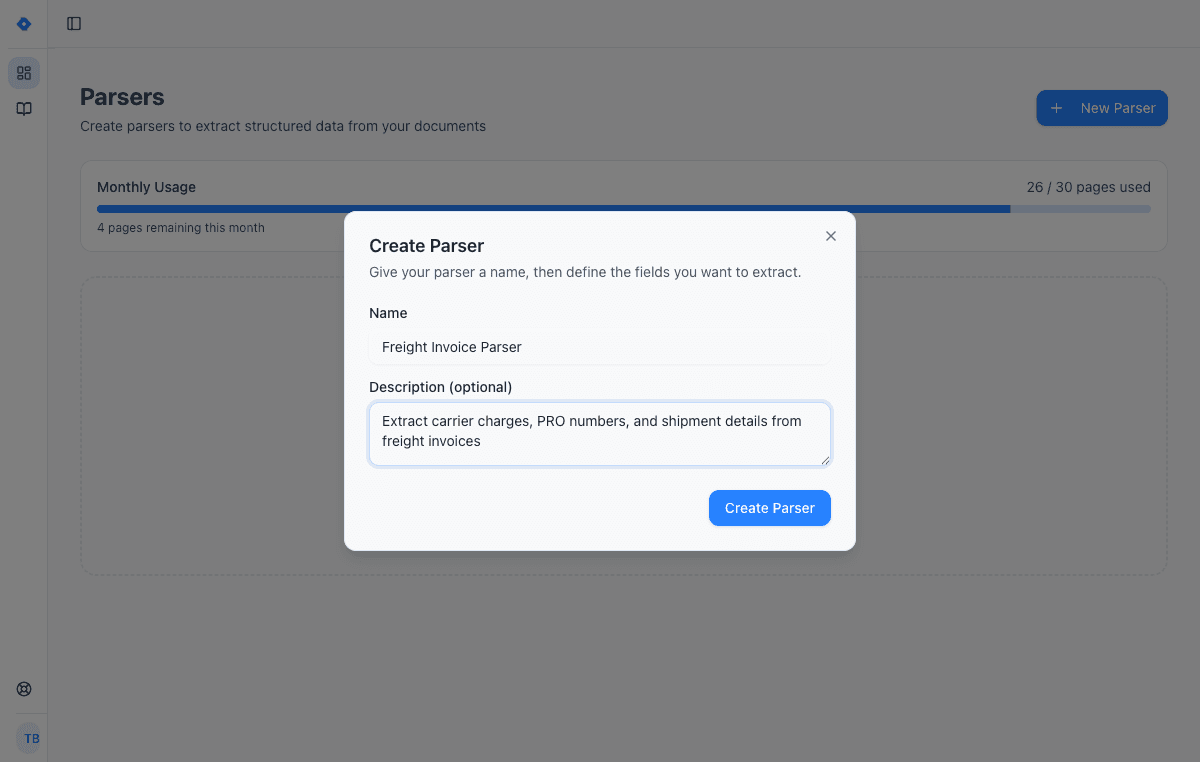
Create a parser
Give your parser a name and description. Each parser is a reusable extraction template — create one for invoices, another for receipts, another for contracts.
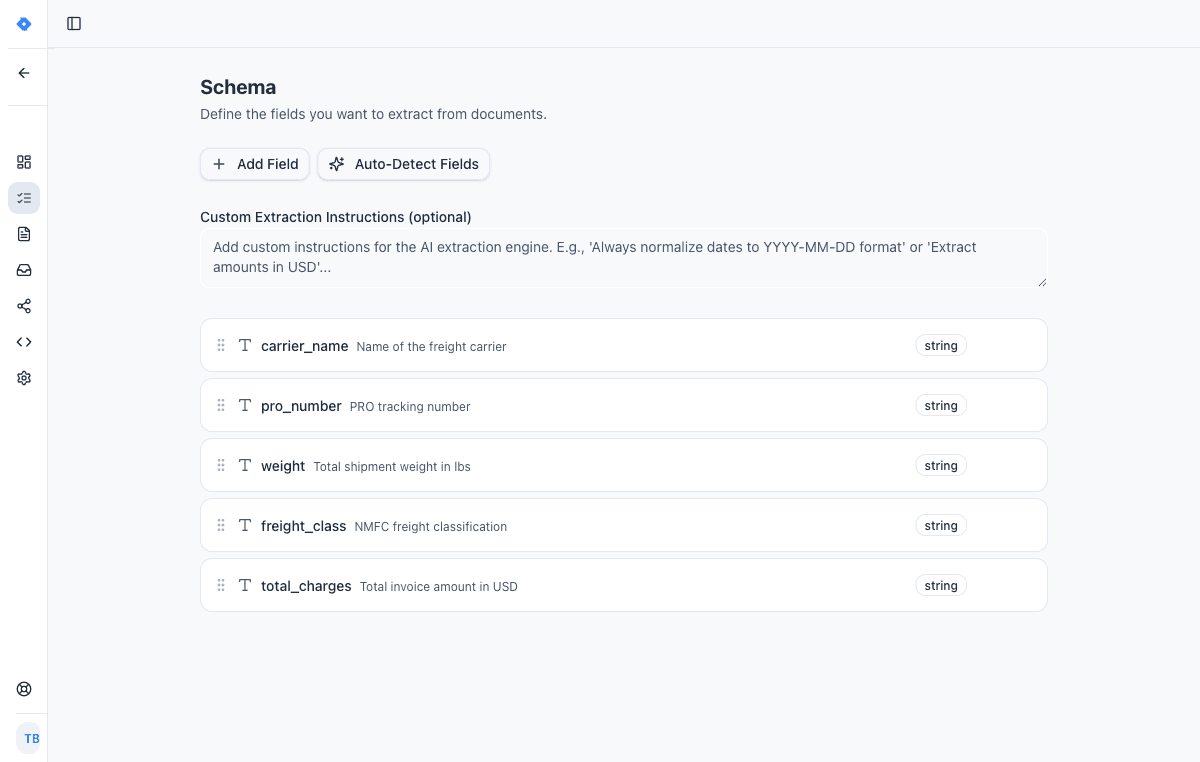
Define your schema
Tell the AI exactly what data to extract. Add fields like “invoice number”, “line items”, or “total amount” — choose from 15 field types including tables, objects, and lists.
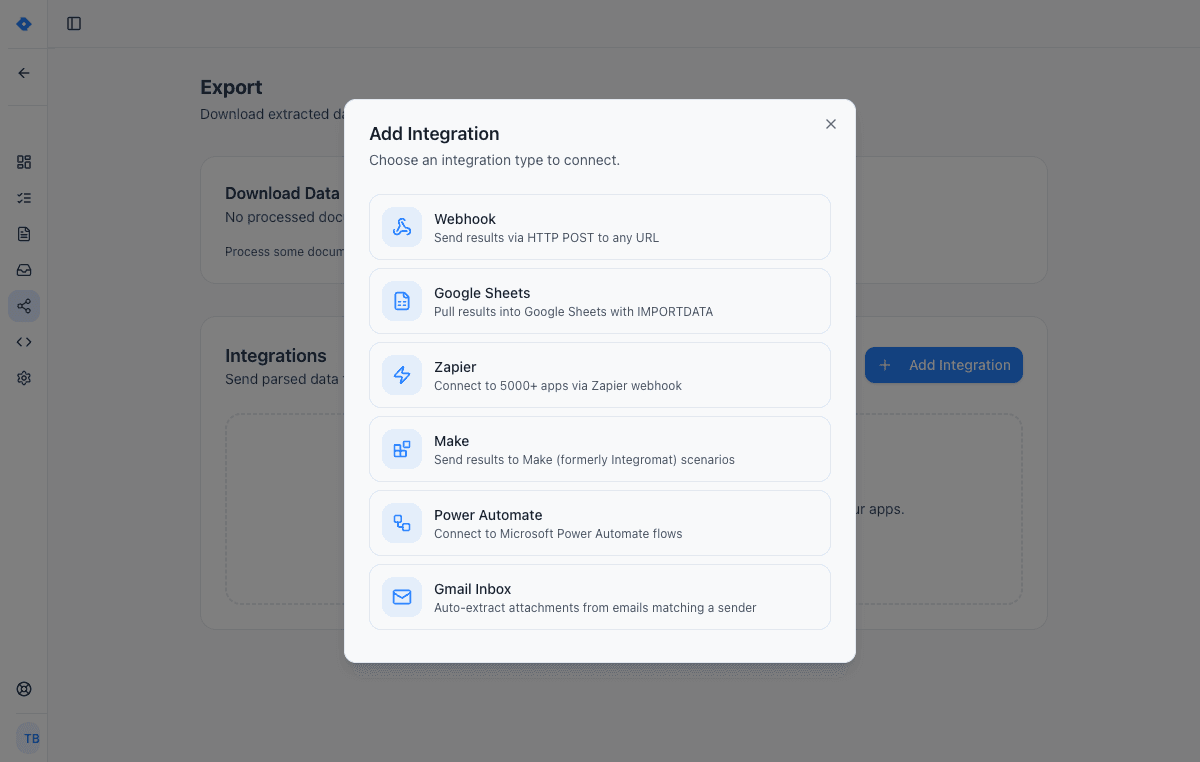
Connect your tools
Send extracted data wherever you need it — Google Sheets, Zapier, Make, Power Automate, webhooks, or Gmail inbox. One-click setup, no code required.
Features
Why teams choose Parsli
Reads Handwriting
Patient-filled intake forms, cursive clinical notes, annotations on printed forms — extracted as typed, structured text with confidence scores on every field.
Any Form, Any Clinic
No two practices use the same forms. Parsli reads any layout without templates, so revised forms, old stock, and forms from referring providers all flow through one parser.
Checkboxes, Lists & Signatures
Beyond plain text: checkbox state, multi-row medication tables, allergy lists, and signature presence come back as typed fields your system can validate.
Lands in Your System
Export to Sheets or Excel, connect Zapier or Make, or use webhooks and the REST API to enter data into your practice management system automatically. Subscribers can request a bespoke integration for their specific system.
What is patient intake automation?
Patient intake automation is the process of turning the documents a new patient brings — intake questionnaires, registration forms, insurance cards, referral letters — into structured data that enters your systems without manual typing. The documents themselves don't change: patients still fill in forms, cards still get photocopied. What changes is what happens next. Instead of front-desk staff reading each page and re-keying fields into the practice management system, an AI reads the documents and returns every field as typed, structured data.
Parsli's approach is schema-based: you define the fields your system needs — patient name, date of birth, member ID, medication list, referring provider — once, and the AI extracts them from any version of any form. Checkboxes come back as true/false values, medication lists as row-per-entry tables, and handwritten answers as transcribed text, each with a confidence score.
Patient forms data entry, automated
The new-patient workflow is the same in most practices: a packet is filled in at the front desk or ahead of the visit, someone photocopies the insurance card, and then a staff member types it all in — the same demographic details entered into scheduling, billing, and the chart. It is slow on a normal day and a bottleneck on a busy one, and every re-keyed field is a chance for a transposed digit in a member ID or a misread date of birth.
With Parsli in front, the packet is scanned once and the data is extracted once. High-confidence fields are ready to import immediately; anything the AI is unsure about — a rushed signature, an ambiguous cursive entry — is flagged for a quick human check. Front-desk staff go from typing every field to reviewing the exceptions, and the structured record is ready for whatever systems need it.
Works with the system you already use
Parsli doesn't replace your practice management system — it feeds it. Extraction output is structured JSON with the field names you defined, and it can reach your system several ways: export to Google Sheets, Excel, or CSV for bulk import; connect Zapier or Make to push records into thousands of applications; or use webhooks and the REST API for a direct integration.
Medical and healthcare centres run this workflow on Parsli today for new-patient document intake — and for teams whose management system needs a specific format or endpoint, we build bespoke integrations for subscribers. Start with the 20 free pages, run a real intake packet through, and see the structured output before connecting anything.
FAQ
Frequently asked questions
What patient documents can Parsli process?
Intake questionnaires, patient registration forms, insurance cards, referral letters, and clinical notes — typed, scanned, photographed, or handwritten. If a document carries data your team currently re-types, Parsli can extract it.
Can it read handwritten patient forms?
Yes. Parsli runs on Google Gemini 2.5 Pro, which reads handwriting including cursive. Every extracted field carries a confidence score, so clearly-written answers flow straight through and doubtful ones are flagged for a quick human check.
How does the data get into my practice management system?
Four ways: export to Google Sheets, Excel, or CSV for bulk import; connect Zapier or Make; receive webhooks the moment a document finishes; or integrate directly via the REST API. Subscribers can also ask us to build a bespoke integration for their specific system.
Do I need to set up a template for each form?
No. You define the fields you need once — the schema — and the AI finds them on any form layout. New form revisions, forms from other providers, and mixed paper/digital packets all flow through the same parser without reconfiguration.
What does Parsli extract from insurance cards?
Member name, member ID, group number, payer and plan name, plan dates, and copay amounts — from a scan or a phone photo of the card. The fields land alongside the rest of the patient record, ready for your billing workflow.
How do I start?
Sign up free — 20 pages included, no credit card — and drop in a real intake packet. You'll see the structured output in seconds, then connect Google Sheets or the API when you're ready to automate the flow into your system.
Explore
One platform, every document type
Same AI extraction engine for all your document processing needs
Works with your stack
Route extracted data straight into the tools your team already uses.
Google Sheets
Paste one IMPORTDATA formula into a Google Sheet and every document Parsli parses — PDFs, invoices, bank statements, emails — appears as a new row. No Zapier, no middleware, no manual export.
Zapier
Use Parsli to extract structured data from any email or document, then use Zapier to route the data to any of 5,000+ apps — CRMs, databases, project tools. Parsli replaces Zapier's built-in Email Parser with real AI; Zapier handles the routing.
Webhooks
Full webhook support for both sending documents to Parsli and receiving extracted data. Connect to any HTTP endpoint with standard authentication options.
REST API
A developer-friendly REST API for extracting structured data from documents. Send files, receive typed JSON. Standard HTTP conventions with Bearer token authentication.
Documents we parse
Specific document formats this solution handles out of the box.
Ready to stop typing patient forms into your system?
Book a demo and see Parsli on your own documents.