Scanned BOLs In,
EDI-Ready Data in Your TMS
Freight still runs on paper — drivers hand over hard-copy BOLs, PODs get photographed at the dock. Parsli's AI extracts them into structured, EDI-ready data and enters it into your TMS or management system automatically. Any carrier, any format.
Why Parsli?
Close the gap between paper freight docs and digital systems
Without Parsli
- Drivers hand over hard-copy BOLs, but your TMS and trading partners expect digital data — so clerks re-key every document
- Trading partners require EDI updates while your source documents are scans, faxes, and dock photos
- Different format for every carrier — UPS, FedEx, XPO, ODFL all look different
- Faded thermal dock prints and carbon copies that traditional OCR can't read
- Scaling volume means hiring more data entry clerks — not a sustainable model
With Parsli
- AI reads any carrier's BOL, POD, or freight invoice — scanned, faxed, or photographed — without templates
- Extracted fields map cleanly to EDI transactions: EDI 856 ship notices, EDI 214 status updates, EDI 210 freight invoice audit
- Structured data enters your TMS, WMS, or ERP automatically via webhooks or REST API
- Handles faded thermal prints, carbon copies, and handwritten driver annotations
- Per-field confidence scores route exceptions to a human instead of into your systems
From dock scan to TMS record — minutes, not days.
Works with Dock-Quality Documents
Google Gemini 2.5 Pro reads faded thermal BOL prints, low-contrast warehouse scans, and even handwritten notes — documents that break traditional OCR. No pre-processing or image cleanup required.
Compatibility
Every document format supported
How It Works
Three steps to structured data
Capture Documents at the Dock
Scan or photograph BOLs and PODs, forward carrier emails, or send files via the REST API. Parsli ingests from any source — no special hardware.
AI Extracts Every Field
Shipper, consignee, PRO number, weight, freight class, piece count, charges — the AI extracts the fields you define from any carrier's layout, with per-field confidence scores.
Data Enters Your TMS Automatically
Structured, EDI-ready JSON flows into your TMS, WMS, or ERP via webhooks or the REST API — or into Google Sheets for teams without an integration layer.
See It In Action
From document to structured data in minutes
No complex setup. No code required. Just define what you need and let AI do the rest.
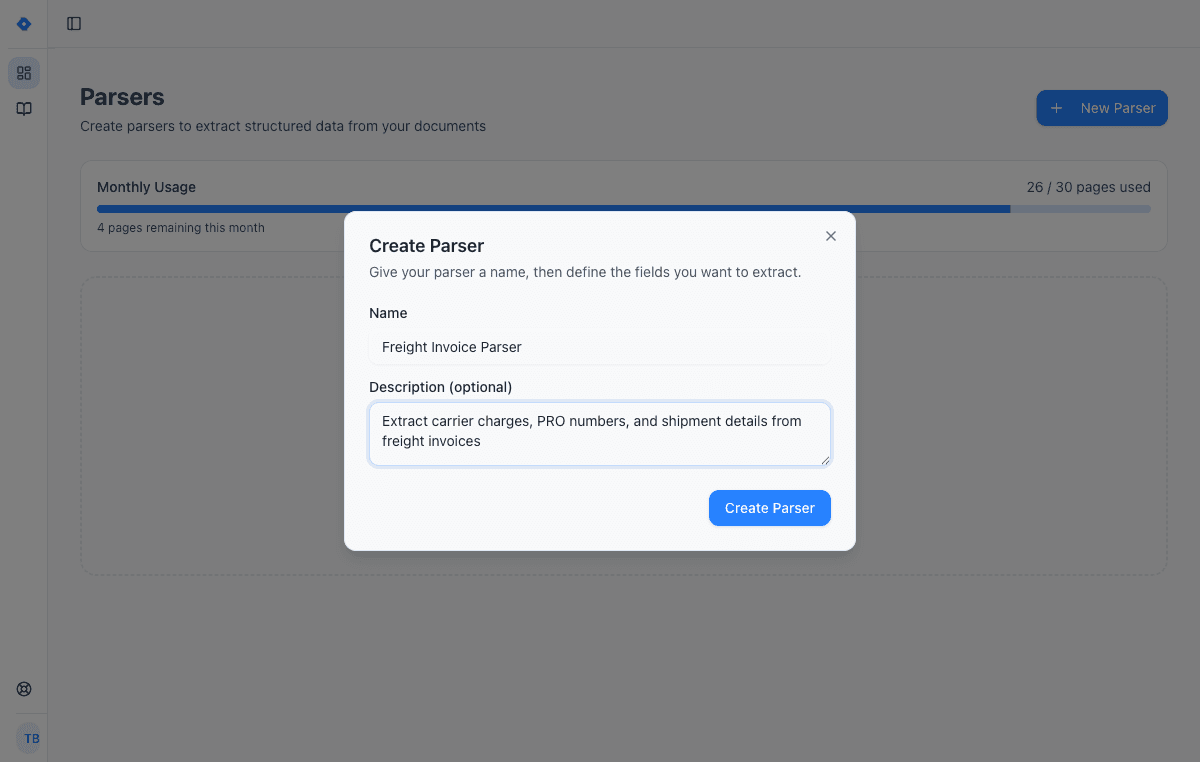
Create a parser
Give your parser a name and description. Each parser is a reusable extraction template — create one for invoices, another for receipts, another for contracts.
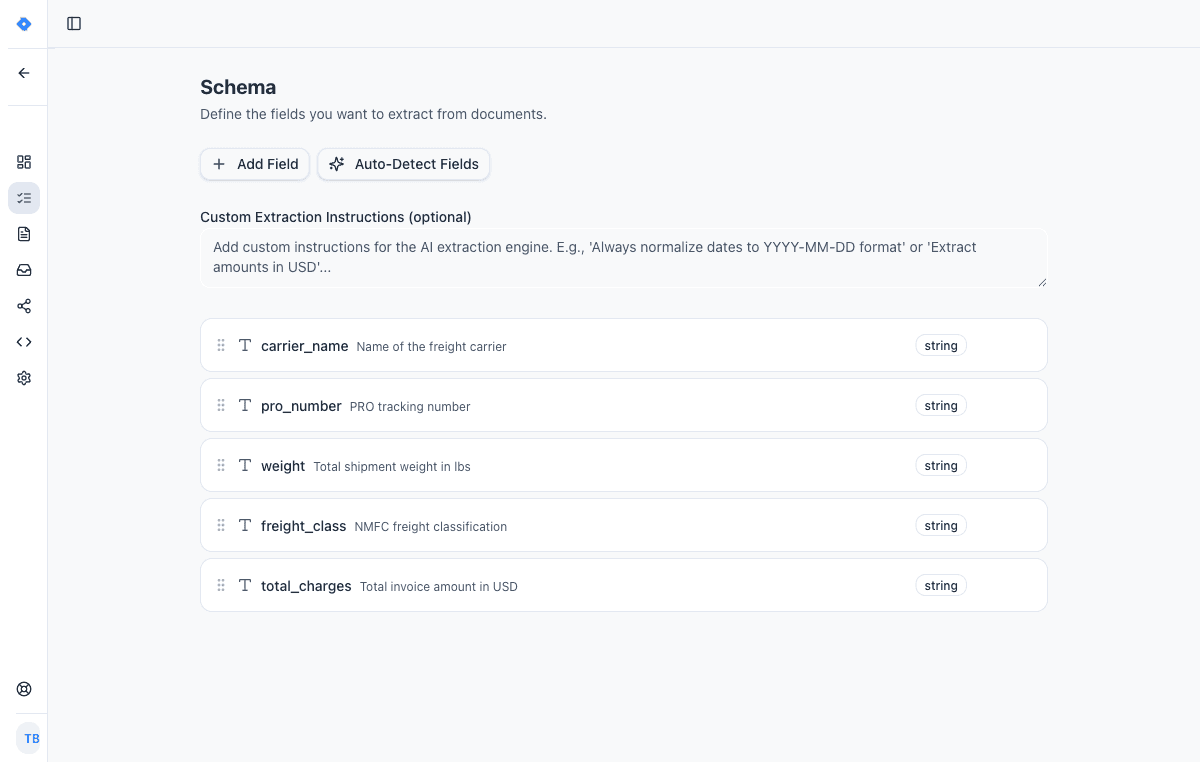
Define your schema
Tell the AI exactly what data to extract. Add fields like “invoice number”, “line items”, or “total amount” — choose from 15 field types including tables, objects, and lists.
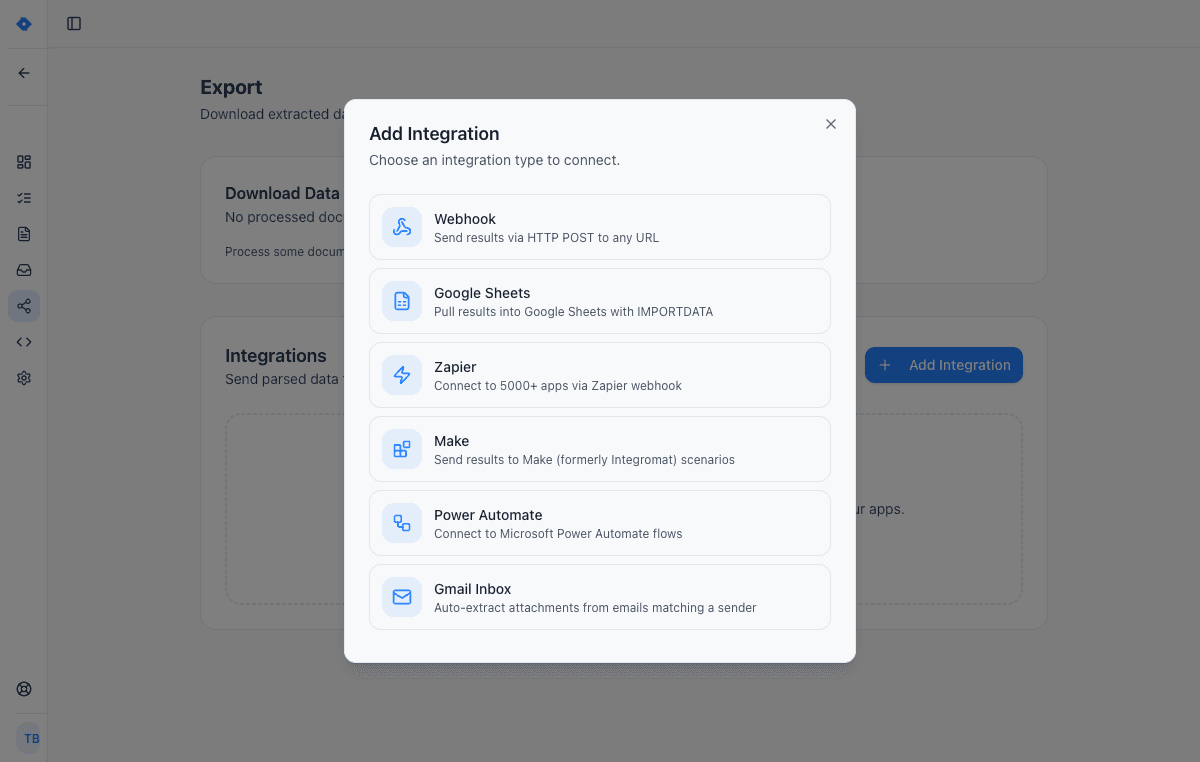
Connect your tools
Send extracted data wherever you need it — Google Sheets, Zapier, Make, Power Automate, webhooks, or Gmail inbox. One-click setup, no code required.
Code Example
Get Started in Minutes
const response = await fetch('https://api.parsli.co/v1/extract', {
  method: 'POST',
  headers: {
    'Authorization': 'Bearer YOUR_API_KEY',
    'Content-Type': 'application/json',
  },
  body: JSON.stringify({
    parser_id: 'your_bol_parser_id',
    file_url: 'https://example.com/bol-document.pdf',
  }),
});

const data = await response.json();
// {
//   "shipper_name": "ABC Manufacturing Co.",
//   "consignee_name": "XYZ Distribution LLC",
//   "weight": "12,450 lbs",
//   "freight_class": "85",
//   "pro_number": "PRO-2026-004817",
//   "description_of_goods": "Industrial components, NMFC 156400",
//   "pieces": 24,
//   "special_instructions": "Dock delivery, no appointment needed"
// }
Features
Why teams choose Parsli
Paper to EDI-Ready Output
Parsli extracts the exact fields EDI transactions carry — shipment parties, PRO numbers, weights, charges — as clean structured JSON your EDI translator or integration layer maps to EDI 856 ship notices, EDI 214 status messages, or EDI 210 invoice audit.
Any Carrier Format
UPS, FedEx, XPO, ODFL, Estes, R+L, Saia — the AI adapts to any carrier's document layout without carrier-specific templates or configuration.
Dock-Quality OCR
Google Gemini 2.5 Pro reads faded thermal prints, crooked scans, carbon copies, and handwritten driver annotations that traditional OCR engines can't process. No image pre-processing needed.
Automated TMS Data Entry
Push extracted data directly into your TMS, WMS, or ERP via REST API or webhooks — no middleware required, no clerk in the loop. Confidence scores decide what enters untouched and what a human reviews first.
Freight still runs on paper — your systems don't
The bill of lading is a physical document by design: it travels with the freight, gets signed at pickup and delivery, and lands on a dock as a thermal print, a fax, or a photo taken in a trailer. Meanwhile everything downstream of the dock is digital — the TMS wants structured shipment records, accounting wants freight invoice lines, and trading partners want EDI messages.
That gap is bridged today by data entry: clerks reading scans and re-keying shipper, consignee, weight, freight class, and PRO numbers into management systems. It is slow, it does not scale with volume, and every re-keyed field is a chance for a wrong weight or a transposed PRO number to reach billing.
Logistics document automation closes the gap at the point of capture: the AI reads the scanned document, extracts the fields your systems need, and delivers structured data — so the paper stays at the dock and the data moves at network speed.
From scanned BOL to EDI-ready data
EDI is the language of freight data exchange: an EDI 856 advance ship notice tells a partner what is arriving, an EDI 214 carries transportation carrier shipment status updates, and an EDI 210 is the motor carrier's freight details and invoice. Every one of those transactions is built from fields that start life on paper — parties, reference numbers, weights, piece counts, charges.
Parsli extracts those fields from the scanned BOL, POD, or freight invoice into clean structured JSON with consistent field names — the shape your EDI translator, integration platform, or TMS import expects. Instead of a clerk bridging paper to EDI by hand, the extraction output feeds the transaction directly: BOL data populates the ship notice, delivery documents confirm status, and extracted freight invoice lines are checked against the rate you agreed before anything is paid.
Parsli outputs structured data rather than raw X12 files, so it slots in front of whatever EDI tooling you already run — it is the capture layer that turns hard-copy documents into transaction-ready data.
Automated data entry into your TMS
The final step is delivery. Extracted data flows out through webhooks or the REST API the moment a document finishes processing, and lands in your TMS, WMS, or ERP as a structured record — shipper, consignee, PRO number, weight, class, charges, all typed and named. Teams without an integration layer route documents to Google Sheets instead and import from there.
Every field carries a confidence score, so you decide the automation threshold: high-confidence documents enter the system untouched, while anything the AI is unsure about — a smudged weight, an ambiguous consignee — queues for a human before it reaches your systems. Scanned batches, emailed PDFs, and dock photos all follow the same path, so one setup covers every way paper arrives.
FAQ
Frequently asked questions
Can Parsli handle different BOL formats from different carriers?
Yes. Parsli's AI adapts to any document layout without templates. Whether it's a UPS, FedEx, XPO, ODFL, or custom carrier BOL, the AI reads the document and extracts the fields you defined in your schema.
Does it work with faded thermal prints and photos taken at the dock?
Yes. Parsli uses Google Gemini 2.5 Pro, which reads faded thermal prints, low-contrast scans, carbon copies, and phone photos significantly better than traditional OCR. No image pre-processing required.
Does Parsli generate EDI files?
Parsli outputs structured JSON carrying the fields EDI transactions are built from — parties, reference numbers, weights, piece counts, charges. Your EDI translator, integration platform, or TMS turns that into X12 messages like the 856 ship notice or 214 status update. Parsli is the capture layer that gets accurate data out of paper documents; it plugs into the EDI tooling you already use.
What are EDI 856, 214, and 210?
Three of the most common freight EDI transaction sets. EDI 856 is the advance ship notice that tells a trading partner a shipment is on the way. EDI 214 is the transportation carrier shipment status message used for tracking updates. EDI 210 is the motor carrier freight details and invoice a carrier sends to bill for transportation. All three are populated from data that starts on documents like BOLs, PODs, and freight invoices — the data Parsli extracts.
Can extracted data enter my TMS automatically?
Yes. Webhooks or the REST API push the structured record into any TMS, WMS, or ERP the moment extraction completes. Teams without engineering resources can route documents to Google Sheets, Zapier, or Make instead and import from there.
Can it extract handwritten driver annotations?
Yes. Handwritten weights, exception notes, and signature presence are extracted alongside the printed fields, each with its own confidence score so doubtful values get a human look before they reach your systems.
Explore
One platform, every document type
Same AI extraction engine for all your document processing needs
Works with your stack
Route extracted data straight into the tools your team already uses.
REST API
A developer-friendly REST API for extracting structured data from documents. Send files, receive typed JSON. Standard HTTP conventions with Bearer token authentication.
Webhooks
Full webhook support for both sending documents to Parsli and receiving extracted data. Connect to any HTTP endpoint with standard authentication options.
Google Sheets
Paste one IMPORTDATA formula into a Google Sheet and every document Parsli parses — PDFs, invoices, bank statements, emails — appears as a new row. No Zapier, no middleware, no manual export.
QuickBooks Online
The native QuickBooks Online integration AP teams use as a QuickBooks receipt scanner and bill-posting engine. AI reads invoices, vendor bills, and card receipts, then creates QuickBooks Bills, Expenses, or Invoices with the source PDF attached. No Zapier middleware, no per-vendor templates. Connect over Intuit's official OAuth in under 60 seconds.
Documents we parse
Specific document formats this solution handles out of the box.
Ready to stop keying BOL data into your TMS by hand?
Book a demo and see Parsli on your own documents.