Best Invoice Matching Software in 2026 (SMB Guide)

Key Takeaways
- Invoice matching means cross-checking an invoice against your own records — the purchase order, the goods receipt, and a price list — before you pay it. It is not the same as bank reconciliation or financial close.
- A 10–50-person business rarely needs a full procure-to-pay suite. Those platforms earn their keep on payment rails and multi-level approval routing at high volume; most SMBs just need each invoice captured accurately and checked against what they ordered.
- The Excel reconciliation that most SMBs start with is fragile — but the spreadsheet itself usually isn't the problem; the manual data entry feeding it is.
- Getting matching wrong is expensive. Best-in-class AP teams process an invoice for $2.78 versus $12.88 for everyone else (Ardent Partners, 2025), and even top performers lose 0.8% of disbursements to duplicate or erroneous payments (APQC, 2020).
- Most matching tools fail at the extraction step, not the matching logic. If the line items come off the PDF wrong, no tolerance rule saves you — accurate capture is the real differentiator, and the thing I'd test first.
- The efficient path for most SMBs is one tool that both captures the invoice and matches it against your records, price list, or a Google Sheet automatically — then routes only the exceptions to you. That's what we built Parsli to do — book a demo to see it run on your own invoices.
Matching is the easy part — reading the invoice isn't
I've spent the last few years building Parsli, and I've sat with a lot of small finance teams while they match invoices by hand. It's always the same scene: a PDF open on one side, a spreadsheet on the other, someone cross-checking line by line — did we order this, did it arrive, is the price what we agreed? At a few invoices a week it's a two-minute job. At roughly 1,500 a year — about 125 a month — it's the task nobody wants and everybody rushes.
Here's the part most "best invoice matching software" roundups skip: the matching itself is the easy bit. The hard bit is reading the invoice correctly in the first place. A 3-way match is just a handful of comparisons. But if the line items come off a messy scanned PDF wrong, no tolerance rule will save you — you've automated the wrong numbers. Get extraction right and matching becomes almost boring, which is exactly what you want.
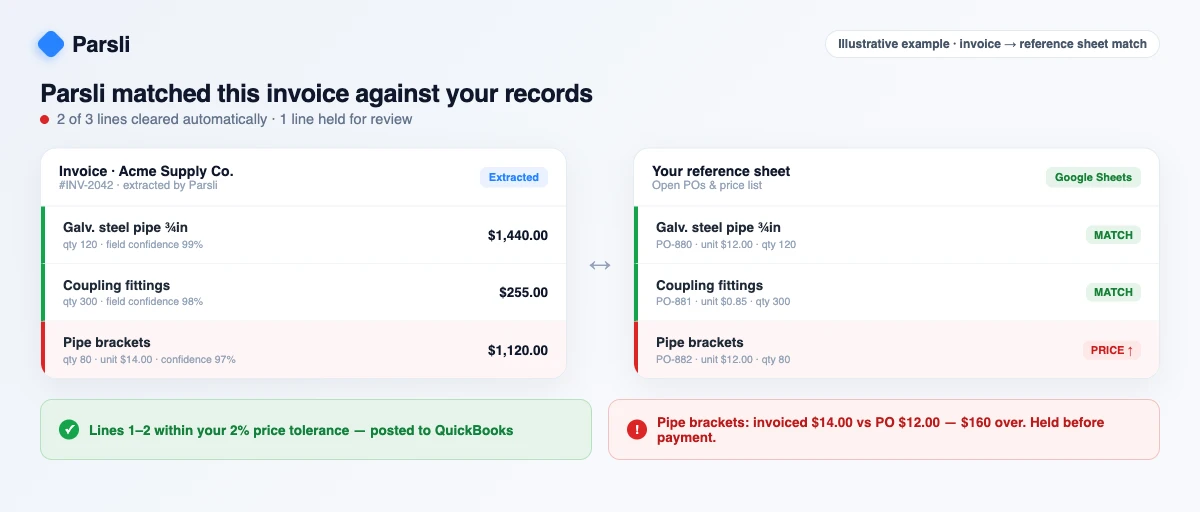
When it works, here's what it catches: your purchase order has 80 pipe brackets at \$12 each; the invoice bills 80 at \$14. That \$160 overcharge never reaches your bank — the match flags it and holds the invoice before you pay (shown below). Do that across every line of every invoice, automatically, and the grind disappears.
This guide is for a small-business buyer. I'll explain how matching actually works, show the real cost of getting it wrong (with sources, not vibes), and compare the tools honestly — and yes, we make one of them, so I'll be straight about where Parsli wins and where it doesn't.
Start here: do you actually need invoice matching software?
Figure out which of three buckets you're in before you shop. Most of the wrong purchases in this category come from a 15-person company buying enterprise procure-to-pay software, or a 200-person company trying to run matching out of a shared spreadsheet. (Accurate extraction is the foundation of any match — if reading the PDF is your only problem, start with our best invoice OCR software roundup; the tools below go a step further and do the matching too.)
- Branch A — Under ~50 invoices/month, or no purchase orders. You don't need a heavyweight AP suite. You need accurate extraction plus a simple check against your price list or a spreadsheet. A single capture-and-match tool is the whole solution.
- Branch B — Roughly 50–1,500 invoices/month, reconciled in a spreadsheet or in QuickBooks/Xero. This is the classic SMB. A tool that reads each invoice and matches it against your records or sheet — flagging the mismatches — beats both a manual spreadsheet and a heavyweight suite, on cost and on time-to-value.
- Branch C — High volume, or you need formal multi-level approval routing plus payment execution. Now a full AP suite (BILL, Tipalti, Stampli) earns its subscription: native matching, approval chains, exception queues, and payment rails in one place.
If you're in Branch A or B, the rest of this guide is mostly about not over-buying. If you're in Branch C, skip to the tool roundup.
See Parsli capture an invoice and match it against your records automatically — book a 15-minute demo.
Book a demoWhat is invoice matching? (and what it's NOT)
Invoice matching is the control of cross-checking a supplier's invoice against your own internal records before you approve it for payment. Those records are typically the purchase order (what you agreed to buy), the goods receipt (what actually arrived), and a price list or vendor master (what you agreed to pay). When everything ties out within tolerance, the invoice is cleared. When it doesn't, it becomes an exception that a human reviews.
It helps to say clearly what invoice matching is not, because the word "reconciliation" gets stretched across several different jobs:
- It is not account or financial-close reconciliation — comparing your general-ledger balances to sub-ledgers or statements at period end.
- It is not bank reconciliation — ticking off ledger entries against your bank statement. (Xero's "Find & Match," for instance, reconciles bank lines, which is a related but separate task.)
- It is not accounts-receivable or billing software — that's the money coming in.
Invoice matching is specifically about the accounts-payable side: validating an inbound vendor invoice before cash goes out the door. So when people search for the "best invoice reconciliation software," what they almost always mean is exactly this — matching a payable against the PO, the receipt, and the price they were quoted. Get that mental model straight and the rest of the category snaps into focus.
2-way vs 3-way matching (and 4-way)
The "N-way" in matching just counts how many documents you compare. More documents means stronger control — and more setup.
2-way match (invoice vs PO)
The simplest check: compare the invoice against the purchase order. Do the line items, quantities, and prices on the invoice match what you ordered? This catches over-billing and quantity padding, but it does not prove you actually received the goods. It's the right level of control for services or for low-risk, trusted vendors.
3-way match (invoice vs PO vs goods receipt)
The workhorse of AP controls. You add a third document — the goods receipt note (GRN), which records what physically arrived. Now you're confirming you ordered it, you received it, and the invoice matches both. This is the standard for businesses buying physical goods, because it stops you paying for items that were never delivered. For very small operations without a formal warehouse, a delivery receipt often stands in as the goods-receipt evidence.
4-way match (+ inspection)
A fourth document — an inspection or quality-acceptance report — is added on top of the 3-way. Common in manufacturing, construction, and regulated industries where "received" isn't enough; the goods also have to pass. Most SMBs never need this.
Tolerances and exception handling
No real-world invoice matches to the penny every time. Freight, rounding, partial deliveries, and minor price drift all create small variances. That's why matching uses tolerances — configurable bands, usually expressed as a percentage or dollar amount on price and quantity (say, accept anything within 2% of the PO price). Inside the band, the invoice clears automatically. Outside it, the invoice is held as an exception for a human to resolve.
Exceptions are where the cost lives. Best-in-class AP operations hold their invoice exception rate to 9%, versus 22% for all other organizations, according to Ardent Partners (2025). Every exception is manual labor, so a tighter, better-automated match isn't a nicety — it's the difference between an AP clerk clearing invoices and one chasing them.
| Match type | Documents compared | Catches | Typical fit |
|---|---|---|---|
| 2-way | Invoice + PO | Wrong price/quantity vs order | Services, trusted vendors |
| 3-way | Invoice + PO + goods receipt (GRN) | Paying for undelivered goods | Most businesses buying physical goods |
| 4-way | Invoice + PO + GRN + inspection | Paying for goods that failed QA | Manufacturing, construction, regulated |
The Excel reconciliation reality (why most SMBs start here — and where it breaks)
Almost every small business starts matching in a spreadsheet, and for good reason: it's free, flexible, and everyone already knows it. You're not imagining how common this is — 64% of accounts-payable professionals surveyed by IDC (cited by AvidXchange) still use spreadsheets in some way to support their payment processes.
The typical SMB workflow is a dual reference: you key the invoice into an Excel log, then run a `VLOOKUP` against a second sheet — your price list or open-PO register — to confirm the numbers line up. It works until it doesn't, and the failure modes are well documented:
- Lookup fragility. A `VLOOKUP` breaks on a trailing space, an inserted column, or a vendor name spelled two ways. The formula silently returns the wrong row or `#N/A`, and nobody notices until a payment is wrong.
- Duplicate misses. Spreadsheets don't enforce uniqueness. The same invoice keyed twice — or received twice — sails through.
- Version chaos and no audit trail. "Final_v3_USE_THIS.xlsx" emailed around a team has no record of who changed what, which is also a segregation-of-duties problem.
- Compounding human error. This is the big one, and it's quantified. Ray Panko's review of field audits found 88% of audited spreadsheets contained errors (Panko, 2008), and across 14 controlled development studies of 967 people the average cell error rate was 3.9% (Panko, 2015). In a sheet of any size, that compounds into a near-certain bottom-line mistake.
A crucial nuance: the spreadsheet itself is rarely the root cause. The errors enter when a human re-keys figures off a PDF into the grid. Manual tasks consume the large majority of an AP practitioner's time — IOFM puts it at roughly 84% — so the leverage isn't ripping out your spreadsheet; it's removing the typing and the manual lookup. The modern move is to let software read each invoice and check it against your reference sheet automatically, so the data was never hand-typed and the match was never a fragile formula.
Keep your spreadsheet — let Parsli read each invoice and check it against your sheet for you. Book a demo.
Book a demoThe real cost of getting matching wrong
If matching feels like low-stakes admin, the benchmarks say otherwise. (To be clear about scope: the cost of extracting invoice data is covered in our invoice OCR roundup; here we isolate the cost of the matching step itself.) It shows up in four places: per-invoice processing cost, cycle time, leakage from duplicate payments, and fraud exposure.
Per-invoice cost. Best-in-class AP organizations process a single invoice for $2.78, versus $12.88 for all other organizations (Ardent Partners, 2025). Note that $12.88 is the "all others" cohort, not the market average — but the gap is the point: manual, exception-heavy matching runs roughly 4–5x more expensive per invoice than an automated, low-exception process. Goldman Sachs put the manual cost even higher for the smallest firms — about $22.26 to process an invoice for a small business, dropping to $6.89 with automation (Goldman Sachs, 2019, via AvidXchange).
Cycle time. Best-in-class teams process an invoice in 3.1 days, while all others take 17.4 days to process (Ardent Partners, State of ePayables 2024). Slow matching means missed early-payment discounts and strained vendor relationships. The same research shows best-in-class teams reach a 49.2% touchless (straight-through) processing rate — nearly half their invoices flow through with no human intervention.
Duplicate and erroneous payments. This is pure leakage. APQC benchmarks show even top performers lose 0.8% of annual disbursements to duplicate or erroneous payments, while bottom performers lose 2% (APQC, 2020). And SAP Concur found 1.29% of processed invoices are duplicates, with the average duplicate worth $2,034 — about $12,000 a month of exposure for a firm running ~450 invoices monthly. Matching controls are exactly what catch these before the money leaves.
Fraud. Weak AP controls are an open door. 79% of organizations were hit by attempted or actual payments fraud in 2024, with checks and business email compromise both cited by 63% of victims (AFP, 2025). A disciplined match — confirming the PO, the receipt, and the bank details — is a frontline defense.
The takeaway for finance teams: the difference between a sloppy and a tight matching process isn't cosmetic. It's measured in dollars per invoice, days per cycle, and percentage points of disbursements.
The best invoice matching software in 2026
One honesty note before the list, the way I'd want it if I were the one buying: I build one of these tools (Parsli), and I have not run your invoices through the other twelve. What follows is what each product is genuinely built for, where it fits a small business, and where it strains — an informed operator's read, not a lab bench-test, and I'd rather you know that going in. I weighed them on the axes that actually matter for matching — how deep the match goes (2-/3-/4-way), how it handles messy and non-PO invoices, accounting fit, and price at SMB volume — from vendor docs and pricing pages in June 2026.
This list is written for an SMB doing roughly 1,500 invoices a year, reconciling in QuickBooks, Xero, or a spreadsheet. Enterprise buyers processing hundreds of thousands of invoices should weight it differently — Medius and Rossum are built for that scale and flagged as such. I've ordered the tools roughly as a buyer meets them: full AP suites first (what most people picture when they hear "matching software"), then the AI extraction layer, then the native ledgers, and Parsli last. Each gets a "best for," what it does, its matching depth, accounting fit, and an honest limitation. (Vendor pricing is as of 2026 and changes often — verify current packaging at quote.)
BILL (Bill.com)
Best for: SMBs wanting a full AP suite with native QuickBooks/Xero sync and built-in payments.
The default SMB accounts-payable platform: capture, code, route for approval, and pay bills (ACH, card, check, international) with native two-way sync to QuickBooks and Xero. It supports 2-way and 3-way PO matching, with multi-level approval routing on all tiers. Published pricing runs from about $49/user/month (Essentials) through Corporate ($89/user/month) and custom Enterprise, plus per-transaction payment fees. Limitation: automated 3-way matching is reported as gated to the pricier Corporate/Enterprise tier (or a procurement add-on), and per-user plus per-transaction fees add up for a tiny team that just wants matching.
Tipalti
Best for: mid-market companies with high-volume, global/cross-border vendor payments.
End-to-end global payables: OCR capture, 2-/3-way matching with AI exception handling, advanced approvals, and mass payouts across 200+ countries and 120 currencies. Integrates with QuickBooks Online, Xero, NetSuite, and Sage Intacct. Pricing is quote-based, with a reported entry platform fee around $99/month and higher multi-entity tiers commonly cited at several hundred dollars a month plus transaction fees. Limitation: built for mid-market global payables — the minimum fees and complexity make it poor value for a small business doing ~1,500 domestic invoices a year.
Stampli
Best for: mid-market AP teams wanting strong invoice-workflow controls plus AI 3-way matching on top of an existing ERP.
Invoice-centric automation built around an AI assistant ("Billy") that centralizes communication, coding, approvals, and matching. It supports 2-way and 3-way PO matching and dynamic, ML-driven approval routing, with optional Stampli payments, sitting on top of QuickBooks (Online and Desktop) and 70+ other ERPs. Pricing is quote-based with no public rate card. Limitation: no published pricing and an upper-mid-market footprint; the rich collaboration layer is more than a 10–50-person team running simple PO matches typically needs.
Ramp
Best for: US-based teams that want corporate cards, expense, and AP bill-pay in one free-to-start platform.
Ramp bundles corporate cards, expense management, and AP bill pay, with native real-time integrations to QuickBooks Online and Xero. Its OCR scans invoices for PO numbers and suggests matches, and it supports 2-/3-way matching and bill payment — but 3-way matching and advanced ERP integrations are reported as gated above the free plan, on the paid Plus tier (reported around $15/user/month plus a platform fee). Verify current packaging at quote. Limitation: beyond the 3-way gating, Ramp is US-centric and oriented around cards/spend, so non-US or pure-AP buyers get less out of it.
AvidXchange
Best for: mid-market firms (real estate, construction, HOA) needing invoice-to-pay across many entities.
Middle-market AP automation with a large supplier network and 265+ accounting/ERP integrations. It does 2-/3-way PO matching, line-item capture, custom approval routing, and payment execution, and is concentrated in 50–200-employee companies. Pricing is quote-based — typically an implementation fee plus a monthly portal fee plus per-payment fees, with reported entry implementations from a few hundred dollars a month. Limitation: implementation fees and contract pricing make it a poor fit and poor value for a small SMB doing modest volume.
Medius
Best for: mid-market/enterprise finance teams needing AI-driven line-item 3-way matching at high volume.
AI-driven, enterprise-grade AP automation that performs 3-way matching across every invoice line item, with approval workflows and invoice-to-pay including global payments. It's ERP-oriented (NetSuite, SAP, Oracle, Microsoft Dynamics) rather than a QuickBooks/Xero SMB tool, and pricing is quote-based with no public figures. Limitation: enterprise scale and ERP orientation make it overkill — and likely cost-prohibitive — for a 10–50-person SMB.
Yooz
Best for: small-to-mid teams wanting an affordable full AP suite with published entry pricing and 2-/3-way matching.
One of the more SMB-reachable suites: AI-powered cloud AP automation with automated 2-/3-way matching against POs and receipts, exception queues, approval workflows, and payment options. It integrates with QuickBooks and other systems, and — unusually for this tier — publishes an entry price, reported around $199/month for its Starter plan (with higher tiers quoted by volume). Limitation: lower-tier feature/volume caps, and ~$200/month can still be more than a small team doing ~1,500 invoices a year wants to spend on a full suite.
Nanonets
Best for: teams wanting flexible no-template AI extraction plus configurable matching/routing workflows.
A template-free AI/OCR platform that extracts invoices and layers on workflow automation: it performs 2-/3-/4-way matching by cross-referencing extracted data against POs and receipts, and can route or auto-approve via email/Slack/Teams. It exports cleanly to Excel/CSV and has native QuickBooks integration (Xero and others via Zapier). Pricing is usage-based (a free Starter with credits, then roughly $0.02–$0.30 per run; commonly under $2/invoice end-to-end). Limitation: no native payment execution, and matching/approvals require configuration — it's an automation toolkit, not an out-of-the-box AP suite, so model the per-run cost.
Rossum
Best for: enterprises processing very high invoice volumes needing best-in-class AI capture feeding an ERP.
Enterprise template-free intelligent document processing (Aurora AI) for high-volume invoice capture, with 2-/3-way matching and rules-based approval routing on top of its capture core — though extraction is the real strength and it's not a payments platform. Pricing is enterprise quote-based, reported around $18,000/year at entry. Limitation: the pricing and scale put it far out of reach for a 10–50-person SMB.
Docsumo
Best for: teams that mainly need accurate extraction from dense, multi-line invoices to feed another matching system.
An IDP/OCR platform that's strong at pulling dense, multi-line invoice tables and exporting them (Excel/CSV/API) into whatever does the matching. It supports validation/review workflows and feeds downstream PO/3-way matching and GL coding, but routing for approval typically means bolting on a separate AP tool — capture, not matching, is the core job. Pricing is quote-based with a free trial; paid plans are custom and can be opaque. Limitation: extraction-only at heart — no native 3-way matching, approvals, or payments — and pricing isn't published.
QuickBooks Online (native)
Best for: SMBs on QuickBooks with light PO volume who can link bills to POs manually.
QuickBooks Online supports purchase orders and lets you manually link or add open POs to a bill (including partial receipts), but it does not natively automate 2-way or 3-way matching or enforce tolerance checks. Automated matching and approval routing come from add-ons (BILL, ApprovalMax, AutoEntry — or a capture-and-match tool like Parsli feeding it). Pricing is the standard QBO accounting subscription; matching capability is an add-on cost. Limitation: PO-to-bill matching is manual — no automated 3-way match, tolerances, or approval routing on its own. (See our QuickBooks integration.)
Xero (native)
Best for: SMBs on Xero with light PO needs who reconcile in the ledger.
Xero supports purchase orders, PO-to-bill conversion, partial billing, and linking a captured bill to outstanding POs — but, like QuickBooks, it has no out-of-the-box automated tolerance logic or GRN checkpoint. True 2-/3-way matching, tolerances, and approval routing require Xero App Store add-ons such as ApprovalMax, or a tool that does the match before the bill lands. Pricing is the standard Xero subscription plus any add-on. Limitation: native matching is manual; you need a third-party app for real 3-way matching. (Our Xero integration covers landing clean, matched data into the ledger.)
Parsli
Best for: SMBs that want accurate invoice capture and* automated matching against their own records, price list, or a Google Sheet — without a heavyweight AP suite or payment rails.*
Parsli is built to do both halves of the job in one place. It reads the invoice — header fields and line items — with continuous accuracy benchmarking, hallucination-prevention safeguards, and field-level confidence signals, then automatically matches each extracted invoice against your own reference data: a Google Sheet, price list, vendor master, open-PO log, or the records in QuickBooks or Xero. You describe the matching rules in plain language — for example, "flag any line where the invoiced unit price is more than 2% above the PO price, or where the quantity doesn't match the goods receipt" — and Parsli runs that check on every extraction, clearing the clean invoices and surfacing the exceptions for a human. Connectors move data to and from your stack (Sheets, Excel, QuickBooks, Xero), with a REST API and webhooks for anything custom, and a no-code schema builder so you define exactly the fields and checks you want.
The honest boundary: Parsli is not a payments platform. It doesn't cut checks, run ACH, or operate a formal multi-step approval chain. If you need built-in payment execution and layered approvals, pair Parsli with — or choose — BILL or Tipalti. But for the SMB that simply needs every invoice captured accurately and checked against what they ordered, before it ever reaches the ledger, that's the whole job, and Parsli does it as one workflow. Pricing scales with your volume, and because matching rules are specific to how you buy, the fastest way to see fit is a working demo on your own documents. Limitation: no native payment execution or multi-level approval routing — for an all-in-one procure-to-pay suite, look at BILL or Tipalti.
See Parsli extract and match your own invoices against your records or Google Sheet — book a 15-minute demo.
Book a demoInvoice matching software compared (at a glance)
| Tool | Best for | Matching depth | Field confidence | Accounting fit | Payments | Starting price |
|---|---|---|---|---|---|---|
| BILL | Full AP suite with native ledger sync | 2-/3-way (Corporate+) | — | Native QB/Xero | Yes | ~$49/user/mo |
| Tipalti | Global, high-volume payables | 2-/3-way | — | QB/Xero, NetSuite, Intacct | Yes (global) | ~$99/mo (quote) |
| Stampli | Workflow controls on an ERP | 2-/3-way | — | QBO + 70 ERPs | Optional | Quote only |
| Ramp | Cards + expense + bill pay | 2-/3-way (paid Plus) | — | Native QB/Xero | Yes | Free / ~$15/user/mo |
| AvidXchange | Multi-entity invoice-to-pay | 2-/3-way | — | 265+ ERPs incl. QB | Yes | ~Few hundred/mo (quote) |
| Medius | AI line-item match at volume | 3-way (line-item) | Limited | NetSuite/SAP/Oracle/Dynamics | Yes (global) | Quote only |
| Yooz | Affordable full suite | 2-/3-way | — | QuickBooks + others | Yes | ~$199/mo |
| Nanonets | No-template extract + workflows | 2-/3-/4-way (configured) | Yes (per field) | Native QB; Xero via Zapier | No | Free + usage |
| Rossum | Enterprise high-volume capture | 2-/3-way (capture-led) | Yes (per field) | ERP-oriented | No | ~$18k/yr |
| Docsumo | Extract dense line items | Feeds match (none native) | Yes (per field) | Export / API | No | Quote (free trial) |
| QuickBooks (native) | Manual PO-to-bill on QBO | Manual link only | — | Is QuickBooks | Via add-on | QBO subscription |
| Xero (native) | Manual PO-to-bill on Xero | Manual link only | — | Is Xero | Via add-on | Xero subscription |
| Parsli | Capture and match in one, no suite | 2-/3-way (AI rules) | Yes (per field) | Native QB/Xero + Sheets | No | By volume (book demo) |
How to keep your spreadsheet — and let software do the matching against it
Here's the under-served path the suite vendors won't sell you: you probably don't need to replace your spreadsheet or your ledger. If your reference data already lives in a price list, an open-PO sheet, or QuickBooks/Xero, the expensive, error-prone parts aren't where you keep the data — they're the human keying invoices into a grid and the fragile `VLOOKUP` doing the lookup. Replace those two steps and the whole workflow gets faster and more reliable without a migration.
The pattern looks like this:
- Capture once, accurately. Parsli reads each invoice — vendor, date, totals, and every line item — into structured fields, with a confidence signal on each one.
- Match it against your records automatically. Parsli checks the extracted invoice against your reference data — a Google Sheet of prices/POs, your vendor master, or your accounting records — using the rules you set, and decides whether it clears or needs review.
- Review only the exceptions. Clean invoices flow through; the mismatches — wrong price, missing PO, quantity off, possible duplicate — are surfaced for a human, then posted to QuickBooks or Xero or written back to your sheet.
This is the lowest-disruption upgrade available to a Branch-A or Branch-B business: keep the records you already trust, automate both the data entry and the matching, and reserve a full procure-to-pay suite for when payment rails and layered approvals actually become the bottleneck. The companion PDF-to-Excel extraction guide covers the capture mechanics.
How to choose: a checklist by invoice volume
Volume is the cleanest decision axis. Layer the other criteria on top.
- Under 50 invoices/month → Skip the suite. A tool that extracts and checks each invoice against your price list or sheet (Parsli) is the entire stack.
- 50–1,500 invoices/month → A capture-and-match tool feeding QuickBooks, Xero, or a spreadsheet is the sweet spot. You get automated matching and exception handling without paying for payment rails you don't need yet.
- 1,500+/month, or you need formal approval routing + payments → Buy the full suite (BILL, Tipalti, Stampli, Yooz). The payment execution and multi-level approvals justify the subscription at this volume.
Then weight these criteria, roughly in order:
- Extraction and line-item accuracy first. Bad capture poisons every downstream match. This is the foundation — see the OCR/extraction roundup for that decision.
- Does the tool do the match for you, or just hand you data to match yourself? For an SMB, "captures and matches" is the difference between automation and a faster data-entry tool.
- Layout flexibility — can it read invoices from many vendors without per-template setup?
- Matching depth — do you genuinely need 3-way and tolerances, or is a 2-way enough?
- QuickBooks/Xero integration — native sync or a brittle export?
- Price vs. volume — model per-invoice cost at your volume, not the marketing tier.
- Audit trail — who approved what, and when.
Skeptic's note: every vendor in this space claims high accuracy, and "99%" gets thrown around with no shared definition. Don't take any vendor's number on faith — Parsli's included. The right test is your own messiest invoices and your own matching rules. That's exactly what a demo is for: bring a stack of real invoices and your price list or PO sheet, and watch what clears and what gets flagged before you commit.
Book a working demo and we'll run your real invoices through extraction and matching against your records — so you can see exactly what clears and what gets flagged.
See Parsli in Action
Parsli captures every invoice and matches it against your records — book a working demo on your own documents.
Invoice matching software FAQ
What is invoice matching?
Invoice matching is the accounts-payable control of cross-checking a supplier's invoice against your own internal records — the purchase order, the goods receipt, and a price list — before approving it for payment. When the documents agree within tolerance, the invoice clears; when they don't, it becomes an exception for a human to review. It prevents overpayment, paying for undelivered goods, and duplicate or fraudulent invoices.
Is invoice matching the same as invoice reconciliation?
In everyday usage, yes — when people search for "invoice reconciliation software" they almost always mean invoice matching: validating a payable against your PO, goods receipt, and agreed price before you pay. It's distinct from bank reconciliation (matching ledger entries to your bank statement) and from financial-close reconciliation (tying general-ledger balances to sub-ledgers at period end).
What is the difference between 2-way and 3-way matching?
A 2-way match compares the invoice against the purchase order — confirming price and quantity match what you ordered. A 3-way match adds a third document, the goods receipt note, to confirm you also received the goods. 2-way is fine for services and trusted vendors; 3-way is the standard for physical goods because it stops you paying for items that never arrived. (A 4-way match adds an inspection report on top.)
What is the best invoice matching software for small business?
It depends on volume, but most small businesses are over-served by a full AP suite. Under ~1,500 invoices/month, a tool that both captures the invoice and matches it against your records — like Parsli — covers the job without the cost and complexity of payment rails and approval chains you don't need yet. Step up to a full suite (BILL, Yooz, Tipalti) only when built-in payments and formal multi-level approvals become the bottleneck. Match the tool to your volume rather than buying the most feature-rich option.
How do you reconcile invoices in Excel?
Traditionally, you key each invoice's data into a spreadsheet log, then use a `VLOOKUP` (or `XLOOKUP`) to match each line against a reference sheet — your price list or open-PO register — and a formula to flag any variance outside your tolerance. The weak points are the manual data entry and the fragile lookup. The reliable version keeps the spreadsheet as your reference data but lets software read each invoice and run the match against the sheet automatically, so nothing is hand-typed and no formula silently breaks.
Can invoice matching be automated?
Yes. Full AP suites (BILL, Tipalti, Stampli, Yooz) automate the 2-/3-way match with tolerances, exception queues, approval routing, and payments. Capture-and-match tools like Parsli automate the part most SMBs actually need — reading each invoice accurately and checking it against your records or spreadsheet, then surfacing only the exceptions — without the payment and approval machinery. Best-in-class AP teams reach a 49.2% touchless processing rate (Ardent Partners, 2025), so a high degree of automation is realistic.
What documents are needed for a 3-way match?
Three: the purchase order (what you agreed to buy), the goods receipt note / GRN (proof of what physically arrived — a delivery receipt often substitutes in small operations), and the supplier invoice (the bill). The match clears when price, quantity, and items agree across all three within your configured tolerance.
What is a matching tolerance?
A tolerance is the acceptable variance band between the invoice and your records, set as a percentage or dollar amount on price and quantity — for example, "accept anything within 2% of the PO price." Invoices inside the band clear automatically; those outside it are held as exceptions for human review. Tolerances exist because freight, rounding, and partial deliveries create small, legitimate differences that shouldn't block every payment.
How much does invoice matching software cost?
It spans a wide range. Full AP suites start around $49/user/month for BILL (3-way gated to higher tiers), ~$199/month for Yooz, and quote-based for Tipalti (reported entry ~$99/month) and Stampli, usually plus per-transaction payment fees. Native QuickBooks/Xero matching is manual unless you add an app like ApprovalMax. Capture-and-match tools price by volume rather than per user or per payment, so they tend to be far cheaper at SMB scale — book a demo for a plan matched to your invoice count, and model the total at your volume since per-user and per-transaction fees scale very differently than flat plans.
Ready to stop hand-matching invoices? Book a 15-minute demo and we'll run your real documents.
Book a demoSources
- Ardent Partners (2025) — Best-in-class AP organizations process an invoice for $2.78 vs $12.88 for all other organizations; best-in-class invoice exception rate of 9% vs 22%; best-in-class touchless processing rate of 49.2%. AP Metrics That Matter in 2025.
- Ardent Partners (2024) — Best-in-class AP teams process an invoice in 3.1 days vs 17.4 days for all others. The State of ePayables 2024: Money Never Sleeps.
- APQC, via CFO.com (2020) — Even top performers lose 0.8% of annual disbursements to duplicate or erroneous payments; bottom performers lose 2%.
- SAP Concur — 1.29% of processed invoices are duplicates; the average duplicate is worth $2,034 — about $12,000/month for a firm processing ~450 invoices monthly.
- Goldman Sachs (2019), via AvidXchange — Manual invoice processing costs about $22.26 for a small business, dropping to $6.89 with automation. How the Next Payments Frontier Will Unleash Small Business.
- IDC, cited by AvidXchange — 64% of accounts-payable professionals surveyed still use spreadsheets in some way to support payment processes.
- Ray Panko (2008) — 88% of audited spreadsheets contain errors. What We Know About Spreadsheet Errors (revised 2008).
- Ray Panko (2015), EuSpRIG — Average cell error rate of 3.9% across 14 development studies of 967 people. What We Don't Know About Spreadsheet Errors Today.
- IOFM — Manual tasks consume roughly 84% of an AP practitioner's time.
- Association for Financial Professionals (2025) — 79% of organizations were victims of attempted or actual payments fraud in 2024; checks 63%, business email compromise 63%. 2025 AFP Payments Fraud and Control Survey (2024 data).
Related Articles
How to Extract Data from PDF to Excel in 2026 (Complete Guide)
A practical, no-nonsense guide to getting data out of PDFs and into Excel or Google Sheets. We cover six methods — from free to AI-powered — with honest trade-offs for each.
ComparisonBest Invoice OCR Software in 2026: An Honest Comparison
An honest, detailed comparison of the top invoice OCR and parsing tools in 2026 — covering Nanonets, Rossum, Docparser, Parseur, cloud APIs, and Parsli with real pros, cons, and pricing.

Talal Bazerbachi
Founder at Parsli
Talal is the founder of Parsli, an AI platform for extracting and matching data from invoices and other business documents. He works hands-on with the finance and operations teams automating the invoice workflows this guide is written for.