

QuickBooks Online Integration: Bills, Receipts, and AP Automation
The native QuickBooks Online integration AP teams use as a QuickBooks receipt scanner and bill-posting engine. AI reads invoices, vendor bills, and card receipts, then creates QuickBooks Bills, Expenses, or Invoices with the source PDF attached. No Zapier middleware, no per-vendor templates. Connect over Intuit's official OAuth in under 60 seconds.
Get Started FreeSetup in 7 screens
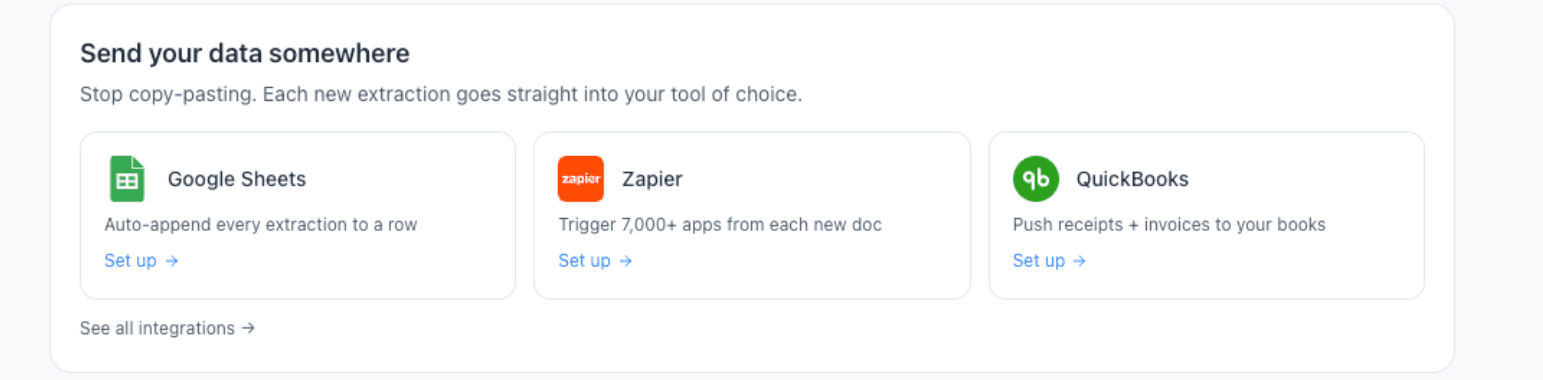
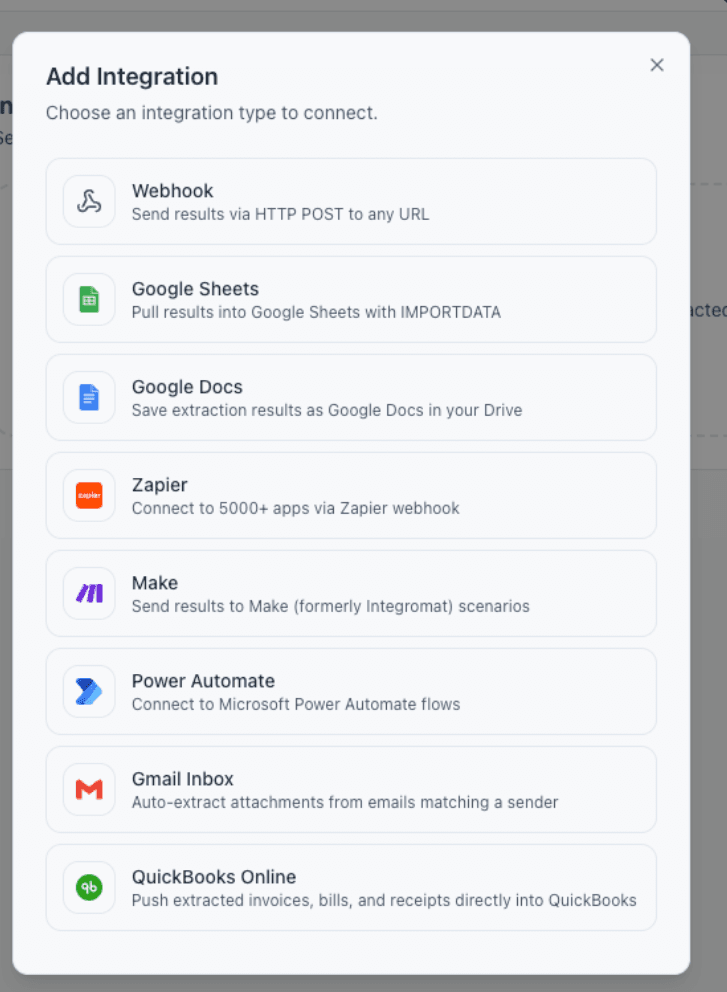
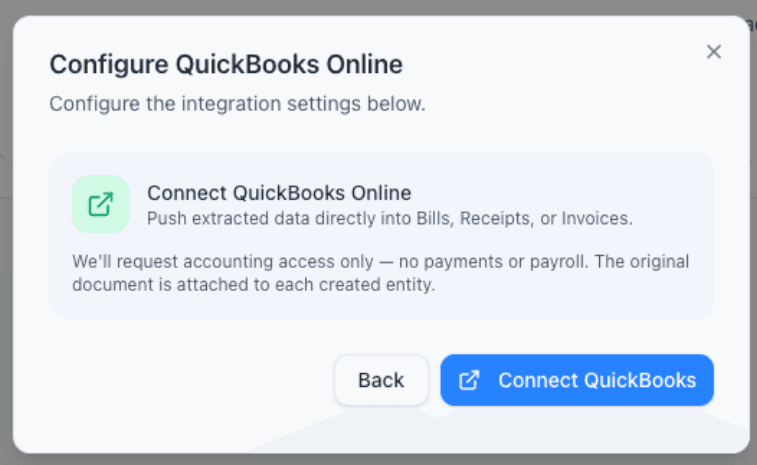
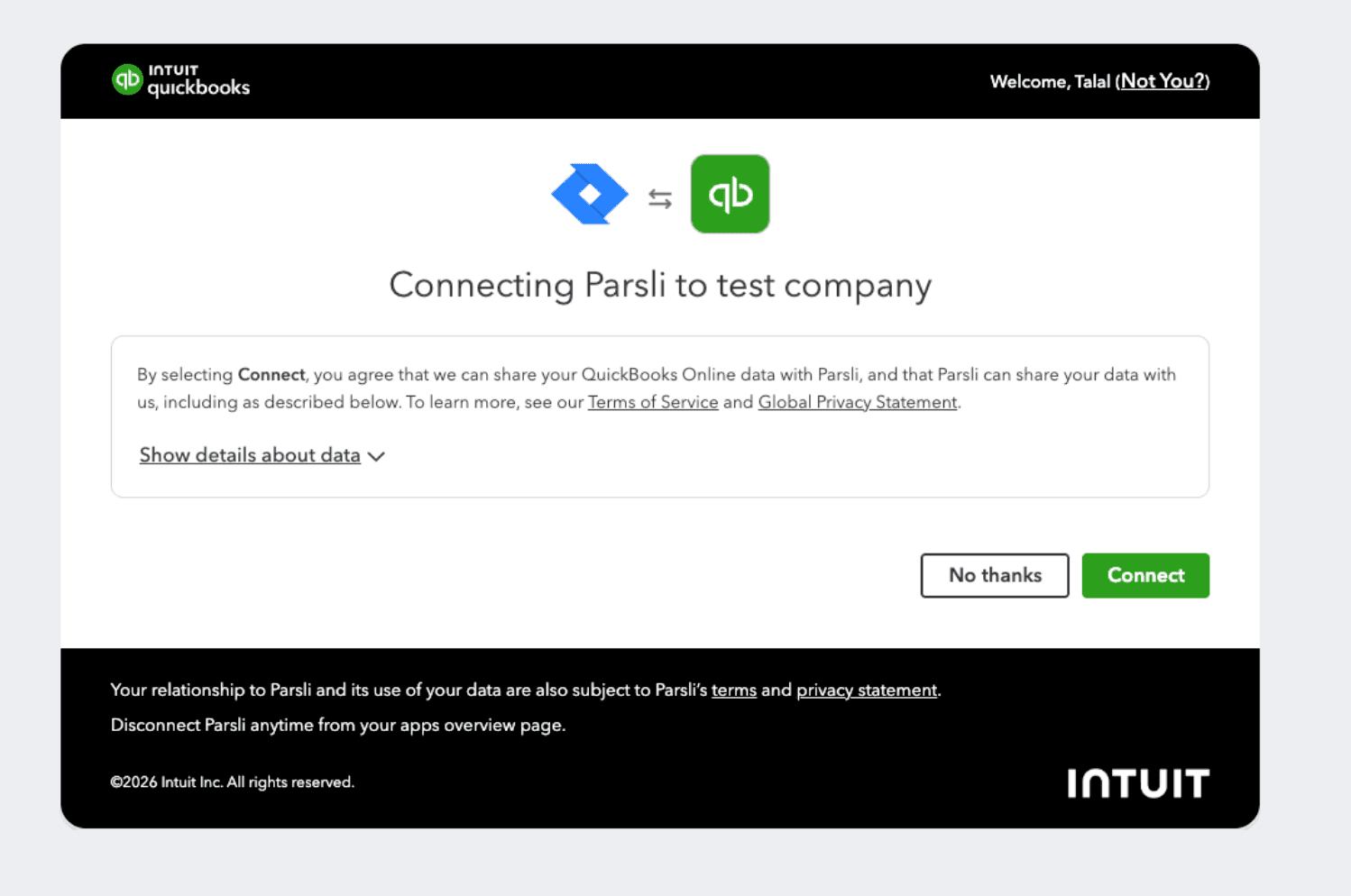
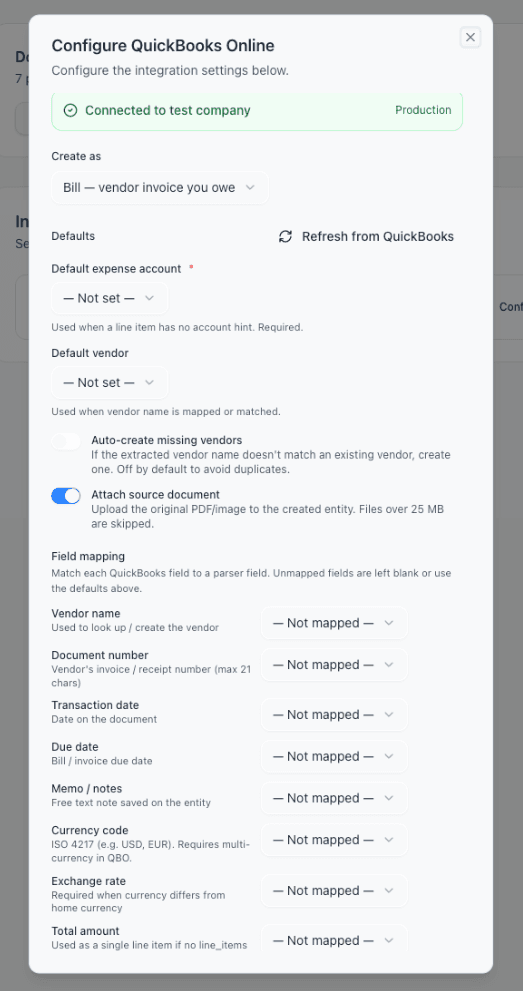
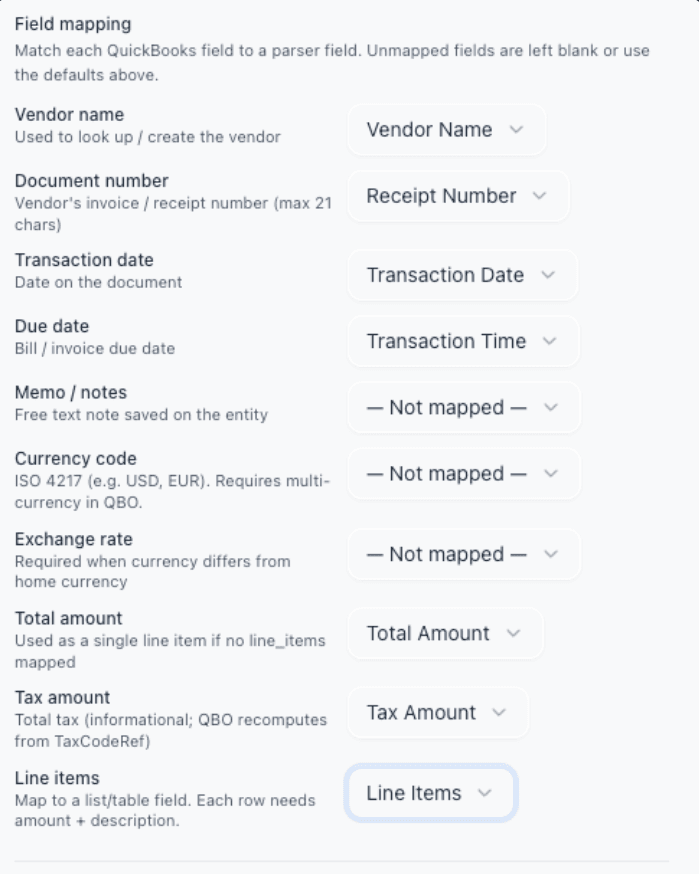
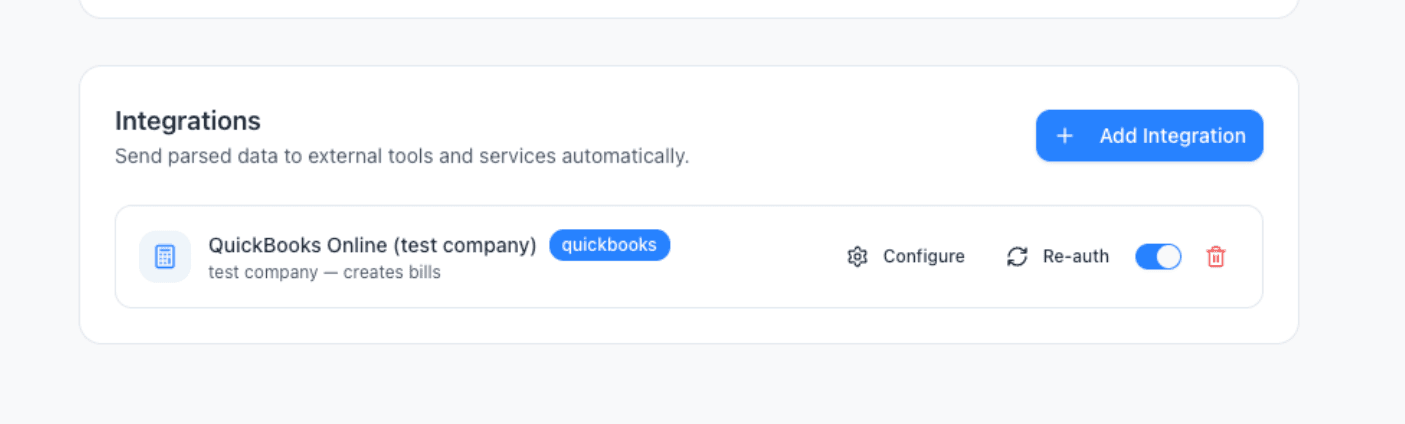
From discovery to a connected, configured integration — the real product UI, not a mockup.
QuickBooks Online and the Intuit Apps platform
QuickBooks Online (QBO) is Intuit's cloud accounting platform — the system of record for millions of US small businesses across plans from Simple Start through Advanced. AP and bookkeeping teams interact with three core entities every day: Bills (vendor invoices you owe), Expenses (cash and card purchases recorded at payment time), and Invoices (sales documents you send to customers). Anything that automates document handling for QuickBooks ultimately writes to one of those three entities.
The way external apps write to QBO has changed over the last decade. The current standard is the Intuit Apps platform: developers list their app on apps.intuit.com, pass Intuit's App Assessment security review, and connect to QBO over OAuth 2.0 against the Accounting API. This is what you see when you click Connect to QuickBooks anywhere on the web — Intuit's branded consent screen, scoped access (accounting only — no payments, no payroll), and revocable from your QuickBooks Apps tab. Direct integrations using this path are first-class. Anything routed through Zapier, Make, or a webhook layer is, by definition, not.
Document-extraction tools sit at a specific layer of the QBO ecosystem: between unstructured AP and receipt sources (PDFs, scans, phone photos, email attachments) and the structured QB entities. The integration's job is to turn vendor name + amount + date + line items into a real Bill, match the vendor against your existing list, attach the source PDF for audit, and never create a duplicate when a document is reprocessed. Done well, this layer handles the entire AP and receipt-capture inbox without anyone typing into QuickBooks. Done badly, it leaks duplicates, drops attachments, or breaks every time Intuit rotates an OAuth token.
Why a native QuickBooks integration beats Zapier middleware and template-based AP tools
Most SMBs running QBO end up choosing between two AP-automation paths and disliking both. Path one is middleware: hook QuickBooks up to Zapier or Make, then wire a third-party parser on top. The result is a fragile chain — three apps, three subscriptions, three failure modes, and per-task fees that compound as your invoice volume grows. When Intuit rotates an OAuth token (their Nov 2025 refresh-token policy made this stricter), your Zap quietly stops posting Bills and you find out at month-end. Path two is template-based AP tools — Dext, Hubdoc, AutoEntry. They post to QuickBooks natively, but they require a setup pass per vendor — drawing extraction boxes on the first invoice from each new supplier — and the template silently breaks the next time that supplier redesigns their invoice.
Parsli's QuickBooks integration is a direct Intuit App listed on the Apps platform — connected via OAuth 2.0 to the Accounting API, secured under Intuit's App Assessment, refresh-token rotation handled per Intuit's 2025 policy. There is no Zapier between Parsli and QuickBooks. There is no template per vendor — the AI reads any layout. Your AP inbox flows: PDF or photo lands → Parsli extracts → Bill, Expense, or Invoice posts in QuickBooks within seconds, with the source document attached as an Attachable. The same connection handles vendor invoices as Bills, card receipts as Expenses, and customer-facing sales invoices as QBO Invoices — pick the target entity per parser.
The receipt-scanner angle is a free upgrade that comes with this. Most teams set up Parsli for vendor bill automation, then realize the same OAuth connection handles QuickBooks receipt capture without buying a separate scanner app. Phone photos of fuel and supply receipts, expense-card statements, and emailed receipts from Uber, AWS, or Office Depot all flow through the same pipeline — extracted, matched to a default expense account, posted as QuickBooks Expenses with the photo or PDF attached. One integration, the entire AP and receipt-capture surface area.
How to Set Up
Connect QuickBooks
Click Connect QuickBooks on your parser's Export tab. A one-click OAuth flow hands you off to Intuit, you pick your QuickBooks company, and you're back in Parsli in 30 seconds.
Map Your Fields Once
Pick the target entity (Bill, Expense, or Invoice), choose a default expense account, and map your parser fields: vendor name, amount, date, line items. The dropdowns are pre-populated from your QuickBooks chart of accounts and vendor list.
Drop in Your Documents
Upload invoices and receipts, forward them by email, or send them via API. Parsli reads them with AI, pulls out every mapped field, and matches the vendor against your QuickBooks vendor list automatically.
Bills and Expenses Appear in QuickBooks
Within seconds, the entry lands in your QuickBooks company with the original PDF attached. Open the Bill, Expense, or Invoice in QuickBooks, review, and post — or set a confidence threshold for auto-posting.
Walkthrough: post property-management Bills and on-site Expenses to QuickBooks automatically
You handle the books for a property management firm with 14 buildings — 80+ vendor bills a month from HVAC, landscaping, plumbing, and pest control, plus card receipts from on-site managers buying supplies at Home Depot, Lowe's, and the gas station. Today, your bookkeeper types every Bill and every Expense into QuickBooks one at a time and manually attaches the PDF or photo. You want both to post themselves, with the source document attached, without buying Bill.com or Dext.
- 1
Decide the QuickBooks entity per document type
Vendor invoices (Net-30 terms, pay later) become QuickBooks Bills. Card and cash receipts (already paid at swipe) become QuickBooks Expenses. Customer rent invoices, if you generate them, become QuickBooks Invoices. You'll create one Parsli parser per category — three total, all pointing at the same QuickBooks company.
- 2
Create the Vendor Bills parser
New Parser → Invoice template. Fields: vendor_name, invoice_number, invoice_date, due_date, total, line_items (with description, amount, account_hint). In Integrations, add QuickBooks Online and connect via the Intuit OAuth flow. Set Create as: Bill. Default expense account: Repairs and Maintenance. Auto-create missing vendors: off (you maintain the vendor list manually).
- 3
Create the Card Receipts parser
New Parser → Receipt template. Fields: merchant, transaction_date, total, tax, payment_method, line_items. Add QuickBooks Online integration — same OAuth, second parser. Set Create as: Expense. Default expense account: Property Supplies. Default vendor: a generic vendor you pre-create in QuickBooks (e.g. "On-site card purchase") for receipt-style transactions where the merchant is unique each time.
- 4
Pipe documents in
For vendor bills: create an inbox forwarding rule from your AP mailbox to the Vendor Bills parser's Parsli inbox address. For receipts: on-site managers either email phone photos to the Card Receipts parser's address, or you connect Gmail and let receipts auto-route by sender. Both feeds run independently. See [/integrations/gmail](/integrations/gmail) and [/integrations/outlook](/integrations/outlook) for the email setup.
- 5
Run a one-week shakedown in sandbox
Parsli supports Intuit's sandbox QuickBooks company — connect a sandbox first if you want to validate field mappings without touching your real books. Forward a week of real documents (or last month's historical files), inspect the resulting Bills and Expenses in the QuickBooks sandbox, adjust any field that's mapped wrong, then disconnect sandbox and reconnect to your production company. Each parser shows a Production / Sandbox badge on the QuickBooks integration card so you always know which environment you're writing to.
- 6
Set the auto-post threshold and walk away
In each parser's QuickBooks integration settings, set the confidence threshold above which extractions auto-post. Most teams start at Medium for the first two weeks (low-confidence items pause in Parsli's review queue), then raise to High once they trust the extraction. From here, vendor bills land as QuickBooks Bills with the PDF attached, on-site receipts land as Expenses with the photo attached, and your bookkeeper's job shifts from data entry to exception review.
What teams build with Parsli + QuickBooks Online
AP automation for property management and multi-location ops
Vendor bills from contractors, plus card receipts from on-site staff at Home Depot, Lowe's, and gas stations. One QuickBooks connection handles both — Bills and Expenses, with PDFs and photos attached automatically.
See the workflowQuickBooks receipt scanner for company cards and travel
Phone photos of card receipts forwarded by email become QuickBooks Expenses with merchant, date, total, tax, and payment method extracted. The image attaches to the Expense automatically — IRS-audit-ready without a separate receipt-scanning app.
See the workflowCustomer Invoice (AR) creation from sales orders
Push extracted sales-order data straight into QuickBooks Invoices for accounts receivable workflows — works on every QBO plan, including Simple Start where Bills aren't supported.
Multi-currency vendor bills
Map ISO 4217 currency codes and exchange rates from international invoices straight into QuickBooks Online's multi-currency setup. Bills post in the vendor's currency with the home-currency conversion calculated by QuickBooks.
Native Parsli ↔ QuickBooks vs. Zapier-or-Make middleware
| Criterion | Parsli | Zapier / Make + QuickBooks |
|---|---|---|
| Connection path | Direct Intuit App + OAuth 2.0 to the Accounting API | Parsli webhook → Zapier/Make → QuickBooks action |
| Setup time | 60 seconds (one OAuth flow, one mapping screen) | 30–60 minutes per workflow (Zap design, mapping, error handling, testing) |
| Per-document cost | One page credit on your Parsli plan | Multiple Zapier tasks per invoice, plus the parser credit |
| Source PDF attached in QB | Yes — uploaded as Attachable up to 25 MB | No — the standard QBO Zap action doesn't upload Bill attachments |
| Duplicate prevention | Deterministic idempotency keys + entity dedup | Manual filters in the Zap; duplicates on retry are common |
| Vendor matching | Fuzzy match against QB vendor list, optional auto-create | Exact-match only, or the action fails |
| Behavior when Intuit rotates OAuth tokens | Parsli handles refresh-token rotation per Intuit's 2025 policy | The Zap's QuickBooks connection often disconnects silently |
Why Use QuickBooks Online with Parsli
- **Native Intuit App, not a Zapier hack** — direct OAuth 2.0 to the Accounting API, listed on Intuit's Apps platform under their App Assessment review
- **Receipt scanner mode included** — phone photos and emailed receipts become QuickBooks Expenses with merchant, date, total, tax, and the image attached, no separate scanner app needed
- **Auto-create missing vendors (optional)** — never stop an upload because a vendor isn't in your list yet; off by default to prevent duplicates
- **Source PDF or photo attached** — every Bill, Expense, and Invoice lands with the original document as a QuickBooks Attachable, so your books keep their audit trail
- **Duplicate-proof** — deterministic idempotency keys plus entity dedup mean the same invoice never creates two Bills, even on reprocess
- **Multi-currency aware** — ISO 4217 currency codes and exchange rates pass through for vendor bills outside your home currency
- **Works with Essentials, Plus, Advanced — and Simple Start for AR** — Bills require Essentials or higher; Invoices and Expenses work on every plan
- **Sandbox-first, production-safe** — validate against an Intuit sandbox QuickBooks company before flipping live; AES-256-GCM encrypted refresh tokens at rest, zero-retention LLM processing
- **Flexible entity mapping per parser** — push vendor invoices as Bills, card receipts as Expenses, and customer invoices as QBO Invoices — all from one OAuth connection
Frequently Asked Questions
Is this a direct integration or does it go through Zapier?
It's direct. Parsli is a QuickBooks app listed on Intuit's developer platform, connected via OAuth 2.0 to Intuit's Accounting API. Your data flows Parsli → QuickBooks with no third-party automation tool in the middle — no Zapier/Make subscription required, no per-operation fees, and no attachment-handling quirks that plague webhook-based integrations.
Which QuickBooks plans does this work with?
QuickBooks Online Essentials, Plus, and Advanced — any plan that supports Bills. Simple Start doesn't have the Bills entity, but we can push Invoices and Expenses. QuickBooks Self-Employed and QuickBooks Desktop are not currently supported.
Can Parsli act as a QuickBooks receipt scanner?
Yes — that's a first-class use case. Forward emailed receipts (Uber, Office Depot, AWS, etc.) or have on-site staff photo card receipts and email them in. Parsli extracts merchant, transaction date, total, tax, and payment method, then creates a QuickBooks Expense with the photo or PDF attached. No separate receipt-scanner app required, and you get the same audit-trail attachment quality as Bills.
Does the original PDF or photo get attached to the QuickBooks entry?
Yes — files up to 25 MB are uploaded as an Attachable on the created Bill, Expense, or Invoice, so the source document stays with the transaction for audit. You see the attachment right in the QuickBooks entity view. Larger files are skipped but the entity still posts.
What happens if the vendor doesn't exist in my QuickBooks?
Your call — toggle auto-create on, and Parsli creates the vendor automatically using the extracted name. Toggle it off (default) and the delivery fails loudly with a clear error, so you can decide whether to pre-create the vendor or update the extracted name. This prevents silent duplicates that plague template-based AP tools.
Will I get duplicate Bills if a document gets reprocessed?
No. Every delivery carries a deterministic idempotency key that QuickBooks honors within its cache window. Beyond that window, Parsli checks whether the prior Bill still exists in your QuickBooks and skips if it does. You'd only get a second Bill if you explicitly deleted the first one in QuickBooks — and then we treat the reprocess as a legitimate recreate.
How secure is the OAuth token storage?
Refresh tokens are encrypted at rest with AES-256-GCM before they ever touch the database, per Intuit's security requirements. Tokens never appear in logs, never ship to the client, and are revoked at Intuit the moment you disconnect. We follow Intuit's Nov 2025 refresh-token rotation policy: the rotated token is persisted immediately on every refresh so your connection can't be invalidated by a race condition.
Does the integration support QuickBooks Online Invoices (AR), or only Bills (AP)?
Both. Pick the target entity per parser. Vendor invoices and bills you owe → Bills. Card and cash receipts → Expenses. Customer invoices you generate (e.g., monthly rent invoices, sales-order based invoicing) → Invoices. The same QuickBooks OAuth connection serves all three; you create a separate parser per document category and set Create as: Bill / Expense / Invoice.
Does it handle multi-currency vendor bills?
Yes, when multi-currency is enabled in your QuickBooks Online company. Map the parser's currency_code field to the QuickBooks currency code (USD, EUR, GBP — ISO 4217), and Parsli passes it through. If the vendor's currency differs from your home currency, map exchange_rate too — QuickBooks calculates the home-currency total automatically. Vendors must already be set up in their respective currencies inside QuickBooks.
Can I test the integration in a sandbox before connecting my real QuickBooks?
Yes. Intuit provides free sandbox QuickBooks companies for any developer-account user, and Parsli's QuickBooks integration recognizes sandbox connections. Connect a sandbox first, run a week of real documents through it, validate the resulting Bills/Expenses/Invoices, then disconnect and reconnect to your production company. Each parser shows a Production / Sandbox badge so you always know which environment you're writing to.
Can I use QuickBooks alongside other Parsli integrations?
Yes. Hook QuickBooks up for AP automation while also sending the same extraction data to [Google Sheets](/integrations/google-sheets) for reporting, Zapier for notifications, or your [REST API](/integrations/api) for custom pipelines. Every integration runs independently per parser.
Where can I read the full method comparison for importing invoices into QBO?
Our [2026 guide to importing invoices into QuickBooks Online](/integrations/quickbooks) compares every method — native CSV import, bill upload, QBO Advanced batch entry, manual entry, and automated email-to-Bill via Parsli — including the US-only bill-import limitation that affects Simple Start, Essentials, and Plus plans.
How do I disconnect?
Two ways. Inside Parsli, click the trash icon on the QuickBooks card — this revokes the OAuth grant at Intuit and deletes the local credentials. Or disconnect from QuickBooks directly (Apps → My Apps → Disconnect). Either path invalidates the token and stops further writes to your books.
Used in these workflows
See how teams actually use QuickBooks Online with Parsli end-to-end.
Pairs well with
Parsli can fan out the same extracted data to multiple destinations — these integrations commonly run alongside QuickBooks Online.
Google Sheets
Paste one IMPORTDATA formula into a Google Sheet and every document Parsli parses — PDFs, invoices, bank statements, emails — appears as a new row. No Zapier, no middleware, no manual export.
Gmail
Set up a Gmail filter, forward matching emails to Parsli, and every invoice, receipt, order, or confirmation becomes structured data in your Sheet, QuickBooks, CRM, or API. Read-only access, no rules to maintain, no Zapier middleware.
Xero
Stop manually entering invoices into Xero. Parsli extracts vendor, amount, date, and line items from any invoice format and pushes the data to Xero via Zapier or Make — automatically.
Zapier
Use Parsli to extract structured data from any email or document, then use Zapier to route the data to any of 5,000+ apps — CRMs, databases, project tools. Parsli replaces Zapier's built-in Email Parser with real AI; Zapier handles the routing.
REST API
A developer-friendly REST API for extracting structured data from documents. Send files, receive typed JSON. Standard HTTP conventions with Bearer token authentication.
Start Using Parsli with QuickBooks Online
Set up in minutes. No credit card required.
Get Started Free