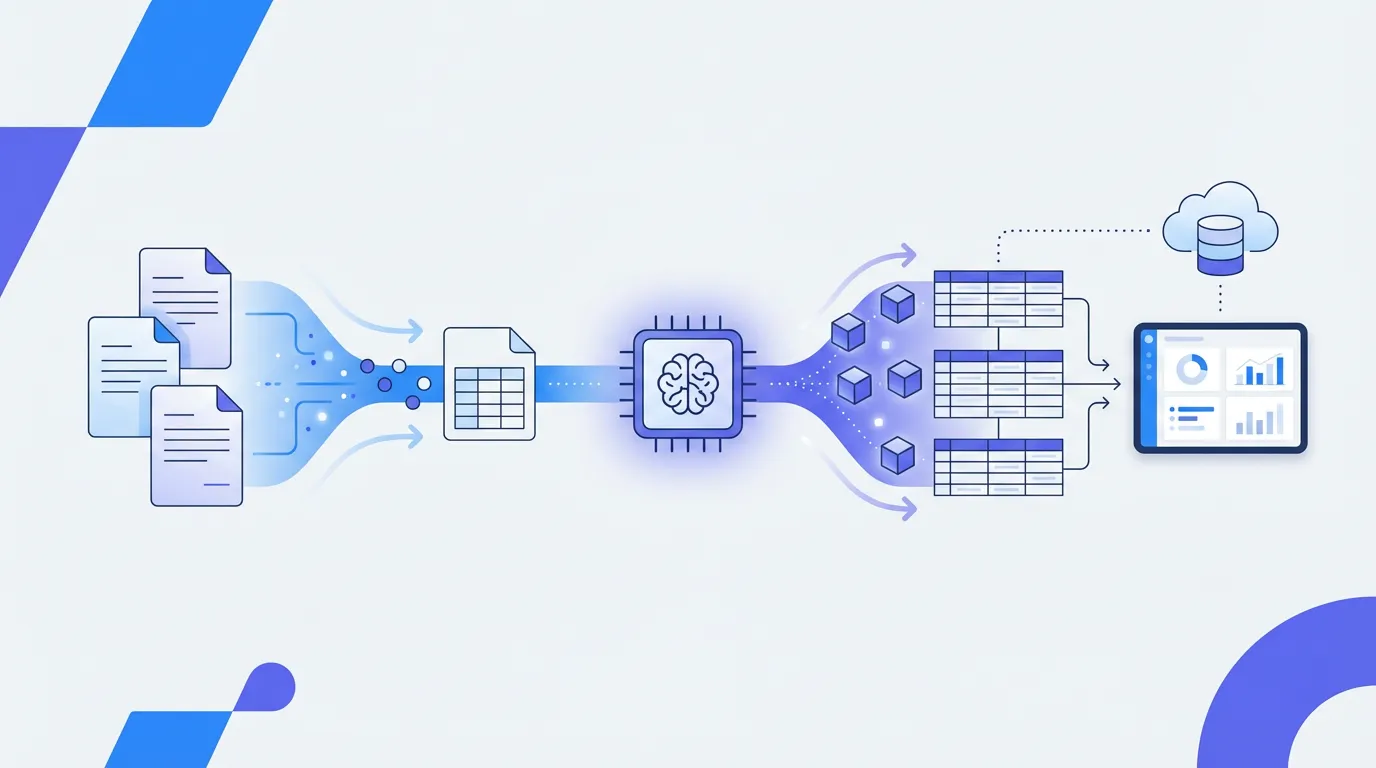
- -OCR (Optical Character Recognition) converts images of text into machine-readable text — it reads characters but doesn't understand document structure
- -IDP (Intelligent Document Processing) combines OCR with AI, NLP, and machine learning to extract structured data with contextual understanding — IDP (Intelligent Document Processing) combines OCR with AI, NLP, and machine learning to extract structured data with contextual understanding
- -Gartner's 2024 Market Guide identifies IDP as a distinct technology category from OCR, with the IDP market growing at 37.5% CAGR vs. 16.7% for traditional OCR (Grand View Research) — Gartner's 2024 Market Guide identifies IDP as a distinct technology category from OCR, with the IDP market growing at 37.5% CAGR vs. 16.7% for traditional OCR (Grand View Research)
- -For simple text digitization, OCR is sufficient. For extracting specific data fields from diverse document formats, IDP is the right tool — For simple text digitization, OCR is sufficient. For extracting specific data fields from diverse document formats, IDP is the right tool
OCR and IDP are often used interchangeably, but they represent fundamentally different levels of document processing technology. Understanding the distinction is important because choosing the wrong one leads to either overpaying for capabilities you don't need or underinvesting in technology that can't solve your actual problem.
What Is OCR?
Optical Character Recognition (OCR) is the technology that converts images of text — scanned documents, photographs, PDFs — into machine-readable text. OCR has been commercially available since the 1970s, with early systems developed by Ray Kurzweil (as documented by the Smithsonian Institution). Modern OCR engines like Google Tesseract (open-source), ABBYY FineReader, and Microsoft Azure AI Vision achieve 99%+ character-level accuracy on clean, printed text.
What OCR produces: a stream of text. If you scan a bank statement and run OCR on it, you get all the text from the page — account numbers, dates, descriptions, amounts, headers, footers, and fine print — all as a single block of unstructured text. OCR doesn't know which text is the account number, which is a transaction date, or which is the closing balance.
What Is IDP?
Intelligent Document Processing (IDP) combines OCR with artificial intelligence — computer vision, natural language processing (NLP), and machine learning — to not only read text from documents but understand what it means and extract specific data fields. Gartner defined IDP as a distinct market category in their 2022 Market Guide, acknowledging that the technology goes substantially beyond OCR.
What IDP produces: structured data. If you process a bank statement through an IDP system, you get each transaction as a row with labeled columns — transaction date, description, amount, running balance — ready to import into a spreadsheet or database. The system understands the document's structure and semantics, not just its characters.
Key Differences
- Output: OCR produces unstructured text. IDP produces structured, labeled data (JSON, CSV, database records).
- Understanding: OCR reads characters. IDP understands document structure, identifies fields, and extracts specific data points.
- Template dependency: Traditional OCR requires templates or rules to map text to fields. IDP uses AI to handle diverse formats without templates.
- Document types: OCR works on any text image. IDP is optimized for specific document categories (invoices, bank statements, forms) where field extraction is needed.
- Accuracy metric: OCR accuracy is measured at the character level (99%+). IDP accuracy is measured at the field level (95-99%), which is the metric that matters for business applications.
- Learning: OCR engines are static. IDP systems can learn from corrections and improve accuracy over time.
- Cost: OCR engines are available free (Tesseract) or low-cost. IDP platforms are priced higher because they include the intelligence layer on top of OCR.
When OCR Is Sufficient
- Digitizing books, articles, or documents where you need searchable text (no field extraction needed)
- Archiving paper documents into searchable PDF format
- Simple text extraction from consistent, single-format documents where regex or keyword matching can identify fields
- Low-volume scenarios where manual post-processing of OCR output is acceptable
- When you have engineering resources to build the extraction logic on top of OCR output
When You Need IDP
- Extracting specific data fields from documents (invoice totals, bank transaction details, form responses)
- Processing documents from multiple sources with varying formats (invoices from different vendors, bank statements from different banks)
- High-volume document processing where manual post-processing doesn't scale
- Business processes that require structured data output (AP automation, bank reconciliation, tax preparation)
- When you need automation that non-technical users can configure and maintain
Parsli is an IDP platform — it uses AI to extract structured data from any document, not just convert images to text. Try it free.
The Technology Behind IDP
IDP platforms typically combine multiple AI technologies in a pipeline. First, OCR converts the document image to text (this is where OCR fits within IDP). Then, computer vision models analyze the document layout — identifying tables, headers, columns, and other structural elements. NLP models interpret the text content, understanding that 'Invoice #' and 'Inv No.' refer to the same concept. Finally, machine learning models map extracted information to the appropriate data fields based on training on similar documents. Stanford's HAI AI Index reports that document understanding AI has improved by 28% in accuracy benchmarks between 2022 and 2024.
Market Context
The IDP market is growing significantly faster than the traditional OCR market. Grand View Research projects the IDP market will reach $12.81 billion by 2030 at a 37.5% CAGR, while the traditional OCR market grows at 16.7% CAGR. This reflects the market's shift from basic text digitization to intelligent data extraction. Gartner, Forrester, and the Everest Group all maintain separate market analyses for IDP, recognizing it as a distinct technology category from OCR.
Frequently Asked Questions
Is IDP just OCR with more features?
Not exactly. OCR is a component of IDP (the text recognition step), but IDP includes substantial additional technology — computer vision for layout analysis, NLP for semantic understanding, and ML for field extraction and learning. Saying IDP is 'just better OCR' is like saying a self-driving car is 'just a better cruise control.' The underlying capability is qualitatively different.
Do I still need OCR if I use IDP?
IDP platforms include OCR as part of their pipeline — you don't need a separate OCR tool. When you upload a scanned document to an IDP platform, it handles OCR internally as the first step before applying AI extraction. You can think of OCR as the 'reading' step and IDP as the 'reading and understanding' step.
Related Resources
More Guides
How to Extract Line Items from Invoices Automatically
Learn 3 methods to extract line items from invoices — manual, Python, and AI-powered. Compare accuracy, speed, and cost for each approach.
Document ExtractionHow to Extract Data from Bank Statements (PDF to Excel)
Learn how to extract transactions, balances, and account details from bank statement PDFs. Compare manual, Python, and AI methods.
Data ConversionHow to Convert Receipts to Spreadsheet Data
Learn how to convert paper and digital receipts into structured spreadsheet data. Compare scanning apps, OCR tools, and AI extraction.
Talal Bazerbachi
Founder at Parsli