AI Document Parser
That Actually Works
Extract structured data from any document — PDFs, scans, images, or emails — without templates or rules. Parsli's AI reads documents the way you would.
No credit card required · first 100 pages free
Why Parsli?
Stop building templates for every document
Without Parsli
- Building and maintaining templates for each document layout
- Parsers break when vendors change their format
- Scanned or image-based documents are unreadable
- Need a developer to write custom parsing logic
- Weeks of setup before extracting a single field
With Parsli
- AI understands any layout — no templates to build
- Adapts to format changes automatically
- Built-in OCR handles scans, photos, and images
- No-code schema builder — anyone can set it up
- Start extracting data in under 5 minutes
Eliminate template maintenance entirely.
Zero Templates, Zero Rules
Unlike template-based document parsers, Parsli's AI reads the full context of every page. It identifies fields semantically — not by position — so it works on any document layout without configuration.
Compatibility
Every document format supported
How It Works
Three steps to structured data
Upload Any Document
Drag and drop files, forward emails, or send via API. PDFs, scans, images, Word, Excel — all supported.
AI Extracts Your Data
Define fields with the visual schema builder. Parsli's AI reads the document and extracts every field you need with 95%+ accuracy.
Export or Integrate
Download as Excel, CSV, or JSON. Or send data to Google Sheets, Zapier, Make, webhooks, or your own systems automatically.
See It In Action
From document to structured data in minutes
No complex setup. No code required. Just define what you need and let AI do the rest.
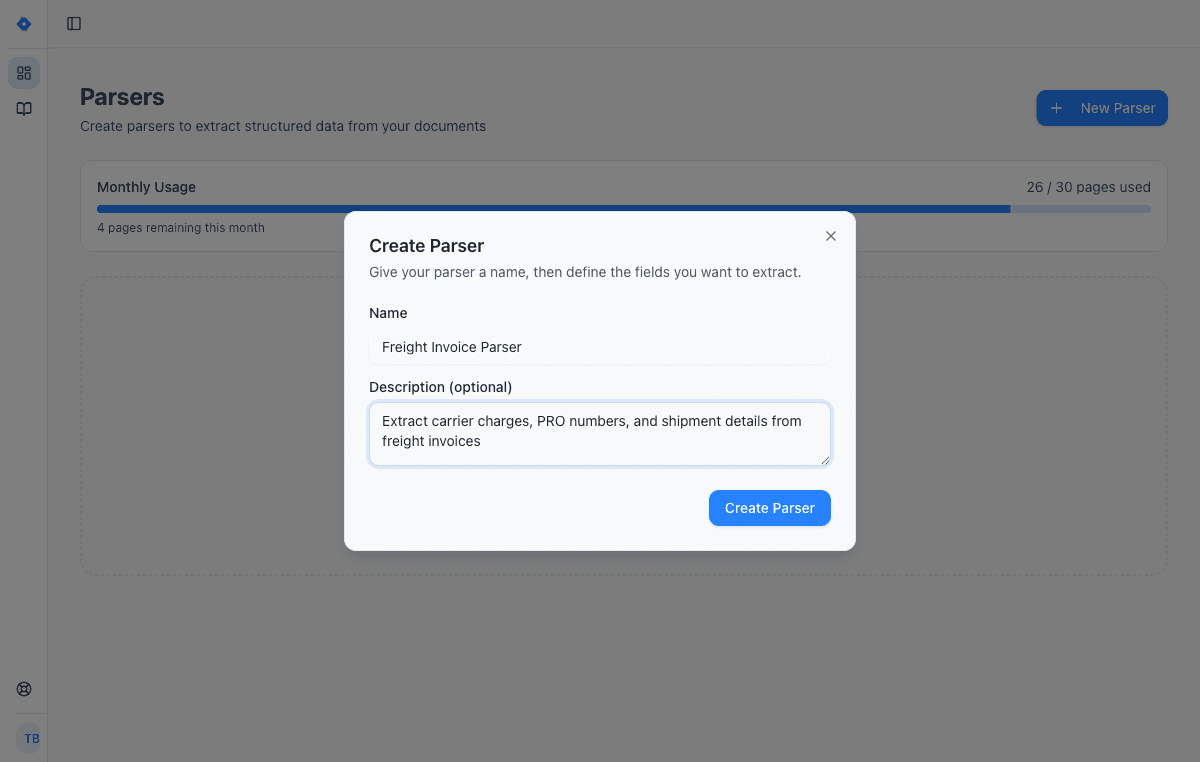
Create a parser
Give your parser a name and description. Each parser is a reusable extraction template — create one for invoices, another for receipts, another for contracts.
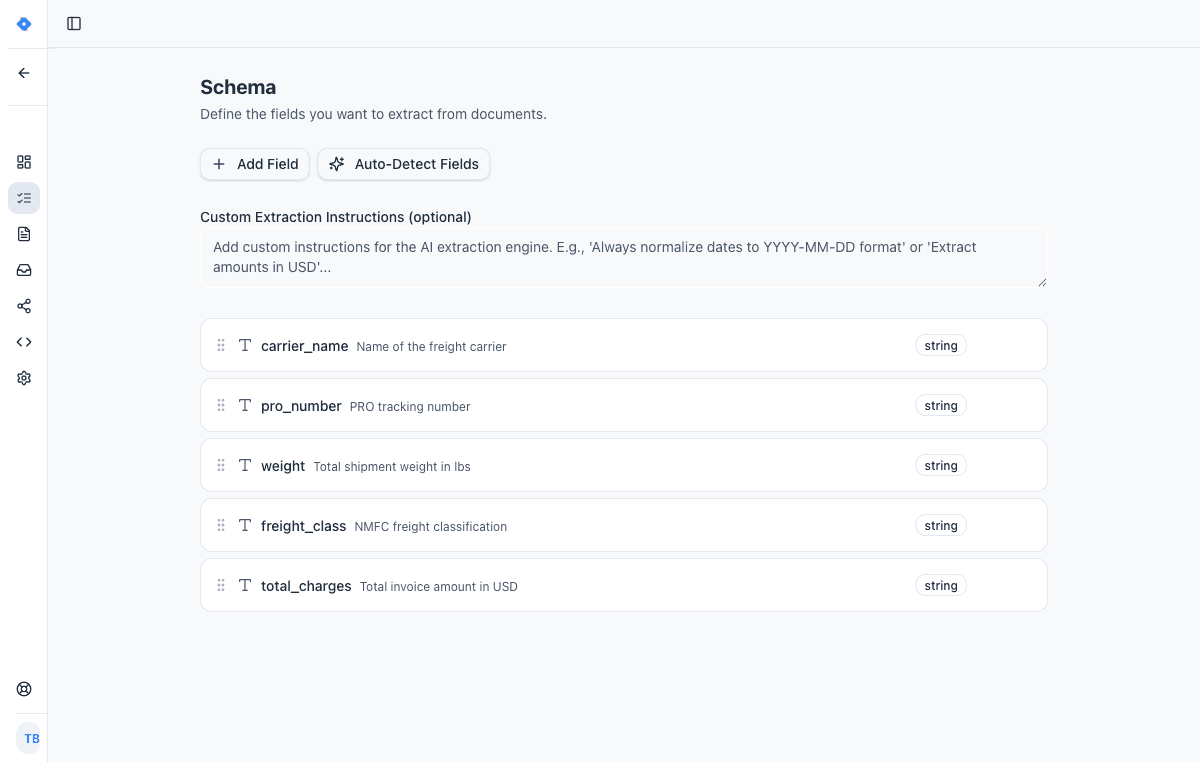
Define your schema
Tell the AI exactly what data to extract. Add fields like “invoice number”, “line items”, or “total amount” — choose from 15 field types including tables, objects, and lists.
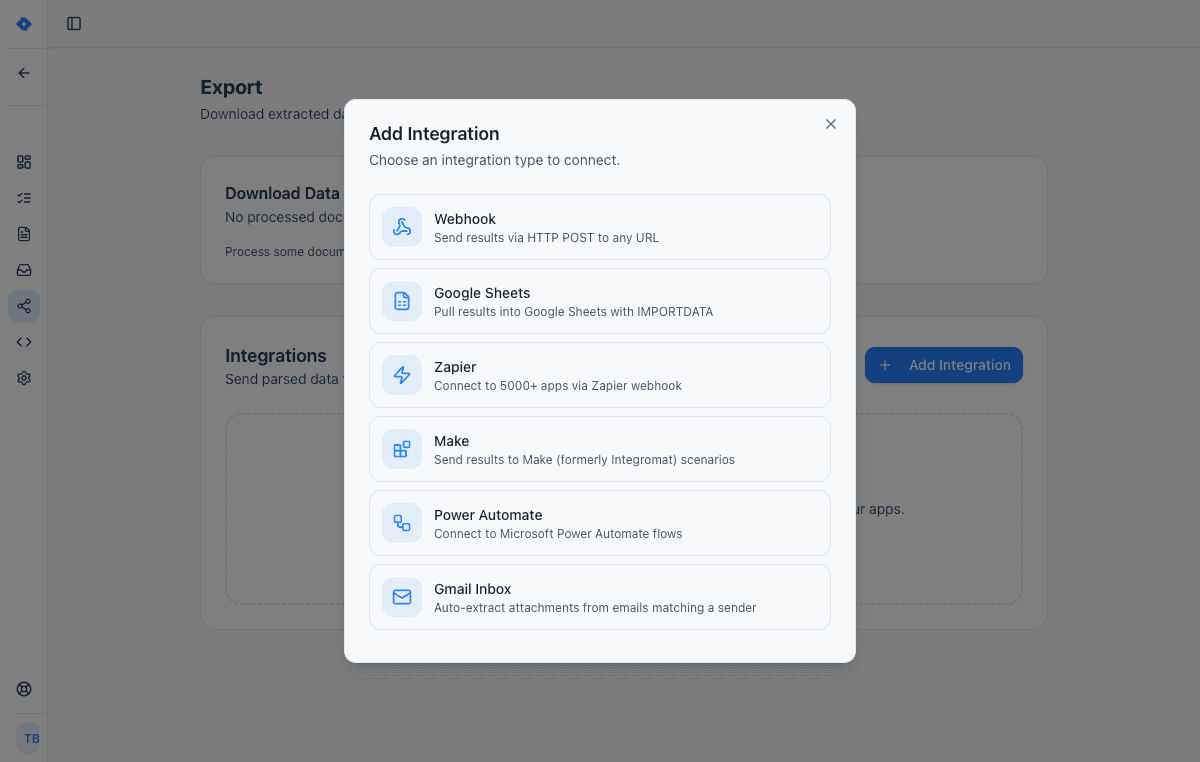
Connect your tools
Send extracted data wherever you need it — Google Sheets, Zapier, Make, Power Automate, webhooks, or Gmail inbox. One-click setup, no code required.
Code Example
Get Started in Minutes
const response = await fetch('https://api.parsli.co/v1/extract', {
  method: 'POST',
  headers: {
    'Authorization': 'Bearer YOUR_API_KEY',
    'Content-Type': 'application/json'
  },
  body: JSON.stringify({
    parser_id: 'your_parser_id',
    file_url: 'https://example.com/document.pdf'
  })
});

const { data } = await response.json();
// data.fields contains your extracted structured data
Features
Why teams choose Parsli
No Templates or Rules
Traditional document parsers require a template for every layout. Parsli's AI understands document structure semantically, so it works on any format out of the box.
Handles Any Document Type
Invoices, contracts, receipts, bank statements, shipping docs — if it contains data, Parsli can [extract it without code](/document-types/pdfs).
Built-In OCR for Scans
Scanned and image-based documents are processed with AI-powered OCR. No separate OCR tool or clean digital file required.
API + No-Code in One Platform
Use the visual schema builder for no-code workflows, or integrate via [REST API](/solutions/document-parsing-api) for custom applications. Both use the same AI engine.
No credit card required · first 100 pages free
What Is a Document Parser?
A document parser is software that extracts structured data from unstructured documents — PDFs, images, scanned files, emails, and more. Instead of manually reading documents and typing data into spreadsheets or systems, a document parser automates the extraction process. According to Grand View Research, the intelligent document processing market was valued at $2.30 billion in 2024 and is projected to reach $12.35 billion by 2030, growing at a 33.1% CAGR — driven by the need to automate document data extraction across industries.
Traditional document parsers rely on templates or rules: you define extraction zones for each document layout, and the parser looks for data at those fixed positions. When formats change or new document types appear, you rebuild the template. AI-powered document parsers like Parsli take a fundamentally different approach — they read the full context of the page and identify fields semantically, adapting to any layout without configuration.
Document Parser vs OCR vs IDP
These terms are related but distinct. OCR (optical character recognition) converts images of text into machine-readable characters — it's a single step in the pipeline. A document parser goes further: it not only reads the text but also understands the document's structure, identifies specific fields, and outputs structured data. IDP (intelligent document processing) is the industry category that encompasses AI-powered document parsing, classification, and validation.
Most modern document parsers include built-in OCR as part of their pipeline. What differentiates them is what happens after text recognition: template-based parsers apply rigid rules to map fields, while AI parsers like Parsli use language models to understand context and extract data from any layout. According to Everest Group's IDP PEAK Matrix, zero-training AI extraction reduces time-to-value from weeks to minutes compared to template-based solutions.
How to Choose a Document Parser
The right document parser depends on your use case, document variety, and technical resources. Key factors to evaluate: Does it require templates or per-format setup? Can it handle scanned and image-based documents? Does it support your output formats and integrations? What's the accuracy on your specific document types?
For teams processing documents from many different sources — multiple vendors, banks, or formats — template-free AI parsing eliminates the largest ongoing cost: template maintenance. Deloitte estimates that 80–90% of enterprise data is trapped in unstructured documents. A document parser that adapts to any format lets you unlock that data without building and maintaining rules for each variation.
FAQ
Frequently asked questions
What types of documents can Parsli parse?
PDFs (native and scanned), images (JPEG, PNG), Word documents (.docx), Excel files (.xlsx), and emails with attachments. If it contains data, Parsli can extract it.
Do I need to create templates for each document type?
No. Parsli's AI understands document structure without templates. Define your extraction fields once, and the AI adapts to any layout automatically. This is the core difference between AI parsing and traditional template-based parsing.
How accurate is the document parsing?
95%+ accuracy on most document types, including complex layouts and scanned documents. Each extraction includes per-field confidence scores for quality control.
Is there a document parsing API?
Yes. Send documents via REST API and get structured JSON back in seconds. See the [Document Parsing API](/solutions/document-parsing-api) for details and code examples.
Can I parse documents without writing code?
Yes — Parsli is a no-code document parser. The visual schema builder lets anyone define extraction fields using plain English descriptions, no programming required. Developers can also use the REST API.
How does Parsli compare to Docparser?
Docparser uses template-based extraction that requires per-format setup. Parsli uses AI extraction that works on any layout without templates. See the [full comparison](/compare/docparser).
Can it handle high-volume batch document processing?
Yes — Parsli works as document processing software at scale. Push hundreds of documents at once via email forwarding, the REST API, or webhooks, and get structured data back automatically. Configure webhook callbacks to receive results the moment each document finishes — no per-document or per-template setup, so volume adds no overhead.
Explore
One platform, every document type
Same AI extraction engine for all your document processing needs
Related workflows
Specific workflows this solution powers end-to-end.
Works with your stack
Route extracted data straight into the tools your team already uses.
Google Sheets
Paste one IMPORTDATA formula into a Google Sheet and every document Parsli parses — PDFs, invoices, bank statements, emails — appears as a new row. No Zapier, no middleware, no manual export.
QuickBooks Online
The native QuickBooks Online integration AP teams use as a QuickBooks receipt scanner and bill-posting engine. AI reads invoices, vendor bills, and card receipts, then creates QuickBooks Bills, Expenses, or Invoices with the source PDF attached. No Zapier middleware, no per-vendor templates. Connect over Intuit's official OAuth in under 60 seconds.
Zapier
Use Parsli to extract structured data from any email or document, then use Zapier to route the data to any of 5,000+ apps — CRMs, databases, project tools. Parsli replaces Zapier's built-in Email Parser with real AI; Zapier handles the routing.
REST API
A developer-friendly REST API for extracting structured data from documents. Send files, receive typed JSON. Standard HTTP conventions with Bearer token authentication.
Industries using this
Teams in these verticals commonly deploy this solution.
Ready to stop building templates for every document layout?
Start extracting structured data in minutes. No credit card required.
No credit card required · first 100 pages free · Cancel anytime