Azure Document Intelligence Pricing 2026: Is It Worth It?

Short answer: if your documents look like the ones Azure was built for — a clean, single, US-format invoice that matches one of its ~14 prebuilt models — it's good and it's cheap. The catch is that the price on the pricing page assumes exactly that, and real document intake rarely looks like it. We ran 13 documents through Azure Document Intelligence and Parsli side by side: on invoices Azure got 86.5% of fields right; on documents outside its prebuilt list, 3.2%.
I'm the founder of Parsli, so I have an obvious interest here — which is why everything below is reproducible. The test documents are either Microsoft's own public samples or synthetic files I generated, the ground truth is known in advance, and the failures are shown as raw output from both engines rather than described. What follows is the 2026 pricing in full, then what the output actually looked like.

Not sure your documents fit Azure's 14 templates?
Send us the messiest three you have. We'll run them live on a call and show you the extracted fields — no schema to configure, no model to train, and an honest answer if Azure is the better fit for your case.
Key Takeaways
- Azure's SKUs stack: a single document often needs Prebuilt and Layout and add-ons, so the effective rate is rarely the $10/1K on the pricing page.
- The most expensive tier is the weakest: Custom Extraction is $30/1K — 20× the Read API — and Microsoft's own transparency note says custom models run on GPT-3.5.
- In our test, four input conditions broke it: multiple documents in one file, degraded capture, off-template layouts, and varied field labels.
- The dangerous failures were the silent ones — a wrong invoice number and a total borrowed from a different vendor, both returned with
status: succeeded.
What Azure Document Intelligence actually costs in 2026
Azure prices per model, not per document, and that's the detail that makes budgeting harder than it looks. Here are the 2026 rates:
| Model / SKU | Price per 1,000 pages | What you get |
|---|---|---|
| Read (OCR) | $1.50 | Raw text. No fields, no structure. |
| Layout | $10 | Text plus tables and structure — as coordinates, not meaning. |
| Prebuilt models | $10 | Named fields for ~14 specific document types. |
| Custom Extraction | $30 | Anything off that list — after you label training data. |
| Add-ons | +$6 | High-resolution, formula, barcode, font. |
| Query Fields | +$10 | Ask for fields the prebuilt model doesn't return. |
| Custom training | $3/hour | After the first 10 free hours each month. |
The number most teams budget with is $10 per 1,000 pages. The number they end up paying is usually higher, because these SKUs combine. A scanned invoice where you need line items and reliable reading of a low-quality scan is Prebuilt ($10) + Layout ($10) + the high-resolution add-on ($6) — $26 per 1,000 pages before a single line of your own code runs. Add Blob Storage, the compute that calls the API, a queue, retry handling, and the engineering time to assemble it, and the API line is a minority of the real cost.
The free tier can't evaluate a real document
The F0 tier looks like a way to try before you buy: 500 pages a month, no charge. But it analyses only the first 2 pages of any request and caps files at 4 MB. Most invoices, statements, contracts and forms worth automating run longer than two pages, so anything you learn on F0 is a partial read of a partial document. You need Standard (S0) before you're evaluating the thing you'd actually buy — which is worth knowing before a two-page trial convinces anyone of anything.
The most expensive tier runs on the oldest model
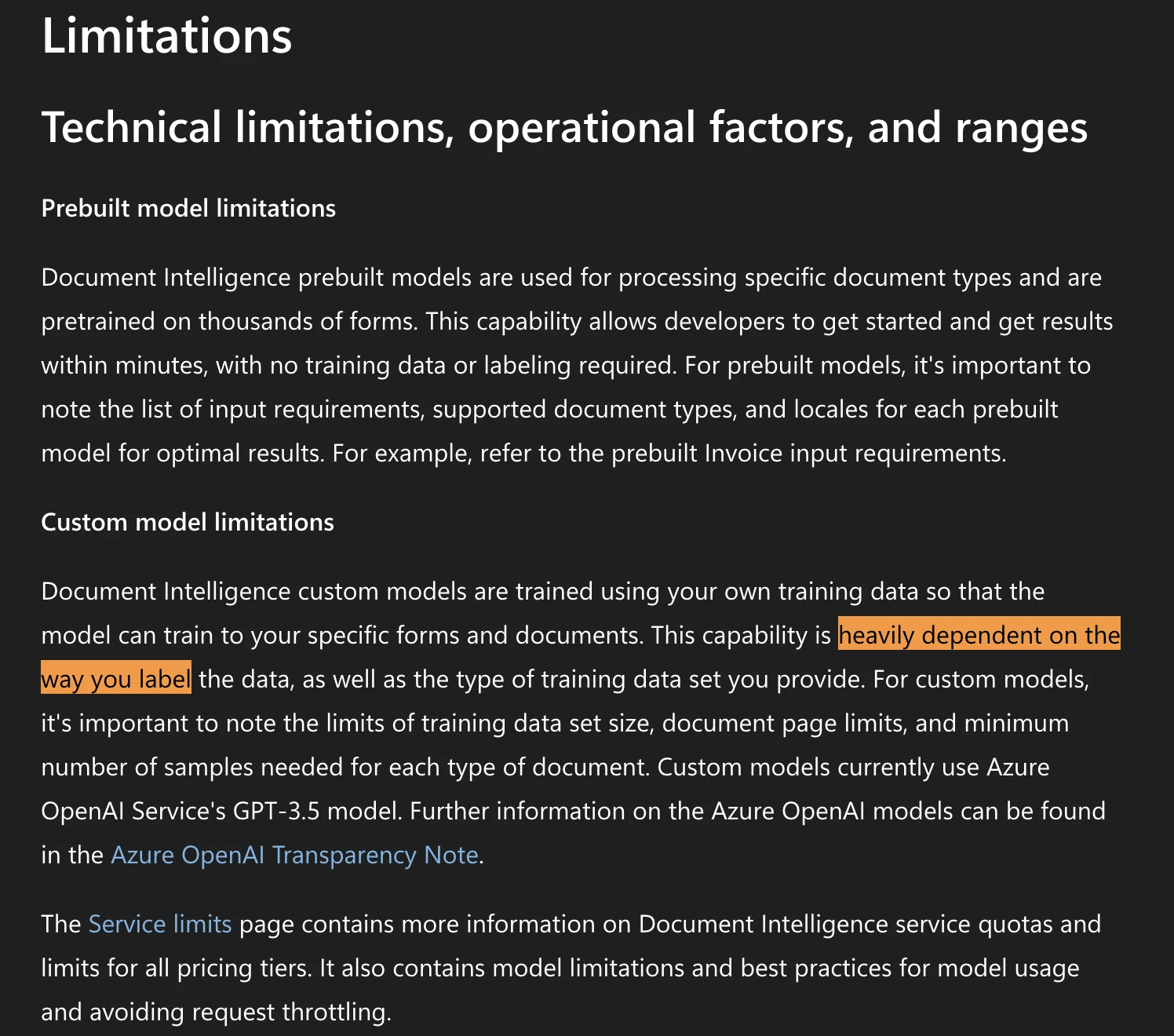
Custom Extraction — the tier you're pushed to the moment your document isn't one of the prebuilt types — is $30 per 1,000 pages, 20× the Read API. It also requires you to label training data, and bills $3/hour for training beyond the first 10 hours a month. And per Microsoft's own transparency note: "Custom models currently use Azure OpenAI service's GPT-3.5 model." You are paying the premium rate, and doing the labeling, for a model generation the rest of the industry moved on from.
We ran 13 documents through both. Here's what came back
Rather than argue about accuracy in the abstract, we tested it. Method, so you can weigh it: 13 documents — Microsoft's own public samples plus synthetic files we generated — each with ground truth known in advance. Both engines got identical inputs. Parsli's schema was set to mirror Azure's prebuilt-invoice field list exactly, so neither side gets credit for fields the other never attempted. Scoring is field-by-field, and normalization is deliberately generous to both (case, punctuation, date formats and number formats all forgiven).
| What was measured | Azure | Parsli |
|---|---|---|
| Invoice fields (89 total) | 77 correct — 86.5%, 2 wrong | 89 — 100% |
| Fields on documents outside the prebuilt list (62) | 2 correct — 3.2% | 62 — 100% |
| Line-item / table rows (36) | 27 — 75% | 35 — 97% |
The aggregate is less interesting than which inputs caused failures — and the pattern is not about document types. It's about the condition the document arrives in.
When one file contains more than one document
This is the most common shape in any real intake pipeline: someone scans a stack. We put three invoices from three vendors into one PDF. Azure returned one merged record — the first vendor's name and invoice number, paired with the third vendor's total.
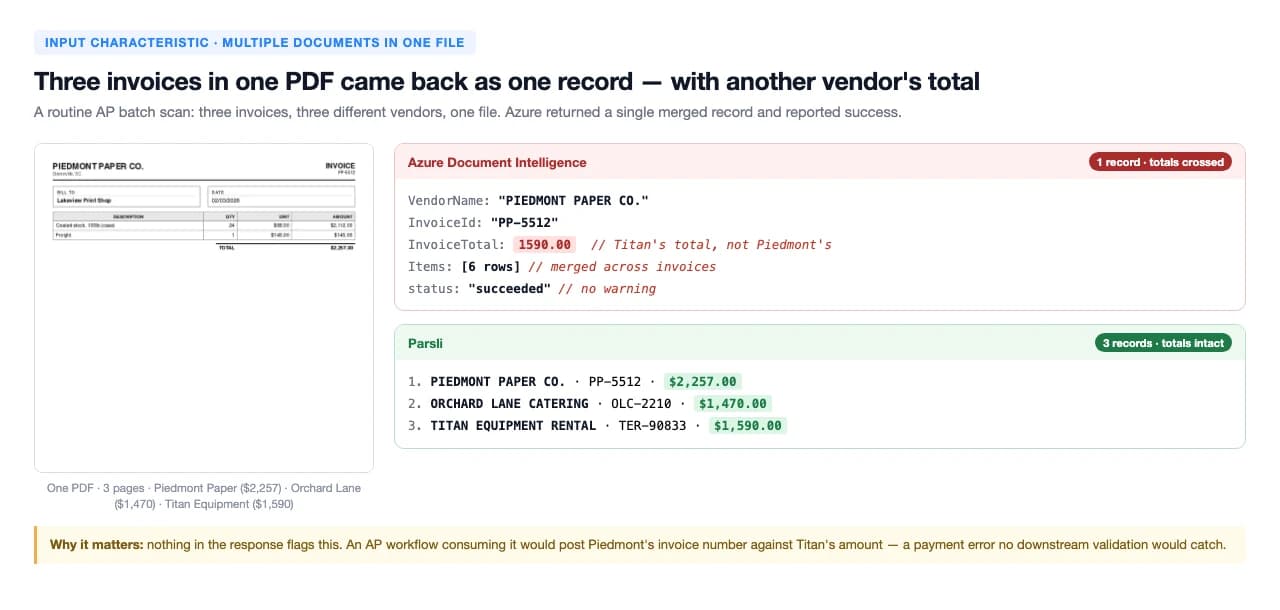
The response carried status: succeeded, no warning field, and no error. A workflow consuming that output would post one vendor's invoice number against another vendor's amount, and nothing downstream would flag it.
When the capture quality is imperfect
Faxes, phone photos, re-scanned paper, anything that has been through a copier twice. We downsampled a clean invoice to a low-resolution scan — the kind that arrives daily — and Azure misread a digit in the invoice number, returning INV-2026-00641 for INV-2026-00841.
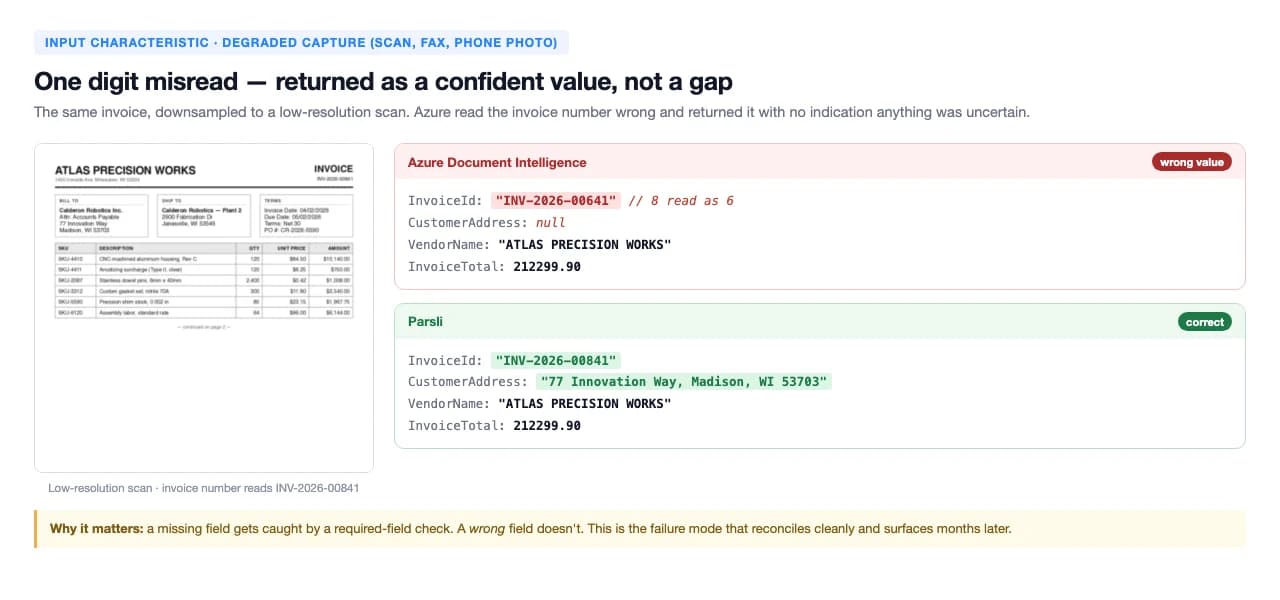
This is the failure mode worth designing against. A missing field trips a required-field check and someone looks at it. A wrong field flows through, reconciles, and surfaces months later as a mystery in the ledger.
When the layout isn't one Azure was trained for
Azure ships prebuilt models for roughly 14 document shapes — invoices, receipts, ID documents, W-2s, a handful of mortgage and tax forms. Documents outside that list have no model, so the result isn't a lower score: it's an empty one. On a freight document with 19 fields on the page, Azure's nearest prebuilt model returned one — and that was a coincidental field-name match.
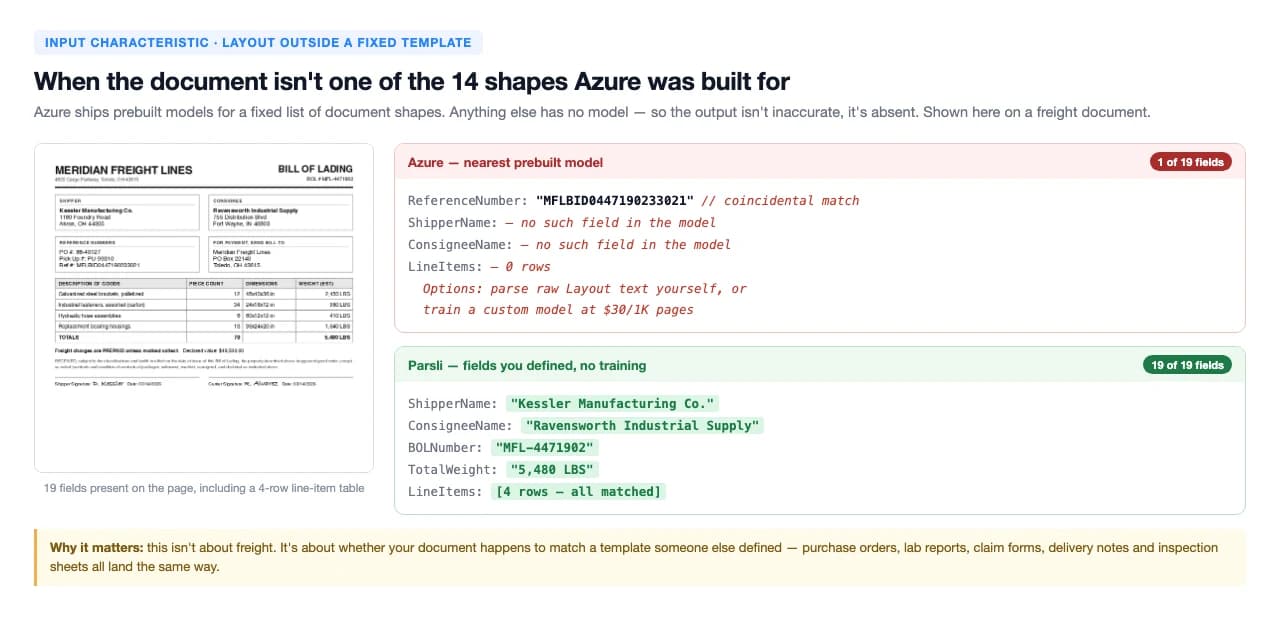
Purchase orders, delivery notes, lab reports, claim forms, inspection sheets, intake forms, packing lists — all land the same way. Your options become parsing raw Layout text yourself, or the $30/1K custom tier plus a labeling project.
When fields are labeled differently than expected
The quietest failure of the four. Azure missed CustomerAddress on five of five invoice variants where it appears — clean, low-DPI, skewed, phone-photo and European. It missed AmountDue on three of five, returning the invoice total but not the figure that says what to actually pay. And when a purchase order was labeled "Contract" instead of "PO", it returned nothing. Parsli returned all of them, because the field is described in your schema rather than matched against a fixed vocabulary.
A note from the author
"I benchmark extraction engines constantly — ours included, and we publish the runs where we lose. I built this test to be re-runnable rather than quotable: every document is public or synthetic, and the ground truth is fixed before anything is scored. Model behaviour shifts every few months, so treat these numbers as a snapshot and test your own documents before you commit to either of us."
Talal Bazerbachi, Founder of Parsli
The four conditions that break it — and what to check on your own documents
Rather than asking "is my document type supported", ask these four questions about how your documents actually arrive. Each maps to a condition we measured.
Does one file ever contain more than one document?
Is anything scanned, faxed, photographed or re-copied?
Do any of your documents fall outside the ~14 prebuilt types?
Do vendors label the same field differently?
It isn't just our test
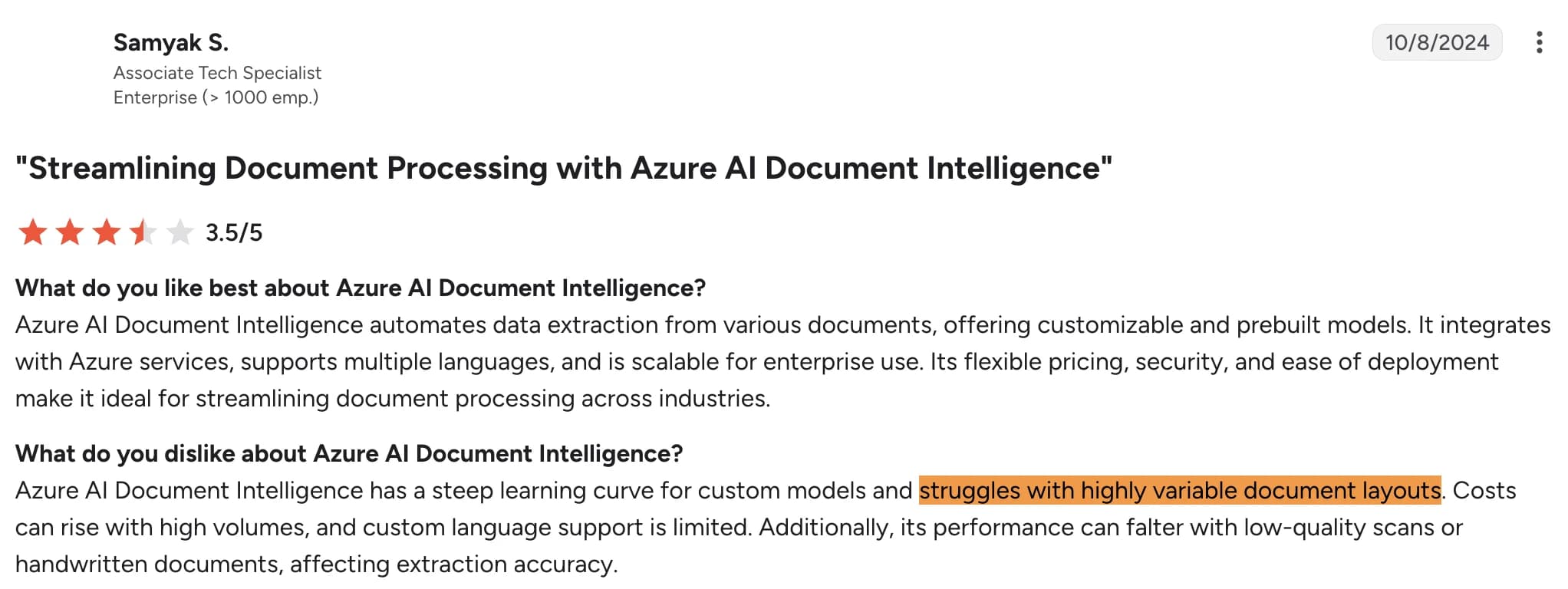
We went looking for whether our results matched what Azure's own users report, partly to check we hadn't built an unfair test. Reviewers on G2 name the same conditions — nested tables, multi-column layouts, handwriting mixed with print, low-quality scans — without any prompting from us.

If you answered no to all four — single clean digital documents, one type, one consistent format, engineers on hand — Azure is a reasonable, cheap choice and you should use it. If you answered yes to any, the API rate stops being the number that matters, because the cost moves to the exceptions.
What about speed?
Azure is faster: a median of 9.5 seconds per document against our 23.9. It's worth being precise about what that difference buys. Azure answered our batch scan in 8 seconds — with the wrong total, and no flag. Our extra ~15 seconds is a verification pass: the engine re-reads what it extracted and checks it against the document before returning, and abstains instead of guessing when the document doesn't contain the answer. For a synchronous UI that latency matters. For an AP inbox processing overnight, a wrong number that arrives 15 seconds sooner isn't a saving.
Find out which of the four applies to you — in 20 minutes
Bring your three worst documents to a call. We'll run them live, show you the extracted fields and the confidence on each, and tell you honestly if Azure covers your case. No schema setup, no model training, nothing to install first.
So what's the best document parsing solution for your documents?
Four realistic paths, depending on what your documents look like and who's available to build. Ours first, with the cases it doesn't fit stated plainly.
1. Parsli — extraction plus the workflow around it
Verdict: the shortest path from "we have documents" to "structured data is moving through our process" — with no model to train and no template to match. You describe the fields you want once, in plain language, and get the same JSON shape back with a confidence score on every field. Any document type, any layout, mixed batches included. We continuously test and tune the engine against the documents it meets in production and re-benchmark models as they shift, so extraction quality improving over time is our roadmap rather than your backlog.
Beyond extraction, workspaces cover the whole process around the documents: accounts payable with department budgets, approvals and invoice matching; bookkeeping firms managing hundreds of clients; clinics processing patient forms. Data lands in QuickBooks, Xero, Google Sheets, Power Automate or your own systems — and on paid plans we build any missing integration free, usually within a day.
2. Azure Document Intelligence
Verdict: cheap and fast for the documents it was built for, and a sensible default if your organisation already runs on Azure. It stops being cheap the moment your documents fall outside the prebuilt list or arrive in less-than-perfect condition — that's when you meet the $30/1K custom tier, the labeling work, and the pipeline you maintain around it.
3. Template-based parsers (Docparser, Parseur)
Verdict: predictable and cheap when layouts never change. You draw zones per layout and extraction is fast — until a vendor redesigns their invoice, at which point template maintenance becomes the job. Compare them in our invoice tools benchmark.
4. Build it yourself on a raw OCR or LLM API
Verdict: maximum control and the lowest per-page cost, and you own everything around it: prompt and schema design, validation, confidence thresholds, retries, queueing, monitoring, and re-testing every time a model changes. A real option with engineering capacity to spare — see our LLM OCR vs traditional OCR breakdown for what that build involves.
See it run on your documents
Twenty minutes, your three hardest documents, live extraction on screen — including an honest answer if Azure is the better fit for your case.
Frequently Asked Questions
How much does Azure Document Intelligence cost in 2026?
The 2026 API rates are Read (OCR) $1.50 per 1,000 pages, Layout $10, Prebuilt models $10, and Custom Extraction $30 per 1,000 pages. Add-ons (high-resolution, formula, barcode) add $6 per 1,000 and Query Fields add $10. Custom model training runs $3/hour after 10 free hours a month. Those are API rates only — Blob Storage, the compute that calls the API, and the engineering time to assemble the pipeline are all separate line items.
Is Azure Form Recognizer the same as Azure Document Intelligence?
Yes — Microsoft renamed Form Recognizer to Azure AI Document Intelligence. Same service, same pricing structure. Older tutorials, SDK package names and Stack Overflow answers still use the Form Recognizer name, which is worth knowing when you're searching for help.
Is Azure Document Intelligence free?
There's a free F0 tier, but it analyses only the first 2 pages of each request, caps files at 4 MB, and allows 500 pages a month. That's fine for a prototype and misleading for an evaluation: most real invoices, statements and contracts run longer than two pages, so you need the Standard (S0) tier before you're testing anything representative.
What's the difference between Read, Prebuilt, and Custom models?
Read returns raw text ($1.50/1K). Layout adds table and structure detection ($10/1K) but still hands you coordinates, not meaning. Prebuilt models return named fields for roughly 14 specific document types ($10/1K). Custom Extraction covers anything outside that list ($30/1K) — and requires you to label training data first. The practical question is which bucket your documents fall into, because it decides both your price and how much work you inherit.
When should I choose Azure Document Intelligence over Parsli?
Azure is the better fit when you're already deep in the Azure ecosystem with engineers available to build and own the pipeline, your documents map cleanly onto one of the prebuilt models, and you need single-digit-second latency inside a synchronous user flow. It's also simply the answer when procurement requires everything to sit under an existing Azure agreement — that constraint outranks feature comparisons.
When should I choose Parsli over Azure Document Intelligence?
Parsli fits when your documents vary in layout, arrive as mixed batches, or fall outside Azure's prebuilt list; when you don't have engineers to build and maintain an extraction pipeline; or when you need the workflow around extraction — approvals, budgets, matching and delivery into your accounting system — rather than an API that hands back JSON and leaves the rest to you.
Does Parsli work with Microsoft tools?
Yes. Extracted data flows into Excel and OneDrive through Power Automate, into Outlook-based intake workflows, and into any Microsoft system via webhooks or the REST API. If the connector you need doesn't exist, we build it for paying customers at no extra cost — usually live within a day.
How we tested
- 13 documents, run 2026-08-07 through Azure Document Intelligence (
prebuilt-invoice,prebuilt-layout, API version 2024-11-30, Standard S0) and Parsli's public extraction API. - Documents were Microsoft's own public sample files plus synthetic documents we generated. No customer documents were used, so every example here is publishable and reproducible.
- Ground truth was fixed before scoring. Parsli's schema mirrored Azure's
prebuilt-invoicefield list exactly, so neither engine got credit for fields the other never attempted. - Scoring is field-by-field as correct / wrong / missing. Normalization forgives case, punctuation, date formats and number formats — including European decimal separators — for both engines. Azure's parsed values were used rather than its display strings.
- Latency is wall-clock per document, reported as a median across all 13.