AI Invoice Processing
Zero Templates, Any Vendor
Stop building templates for every vendor's invoice. Parsli's AI reads any invoice layout and extracts the data you need — invoice number, line items, totals, taxes — in seconds.
No credit card required · 30 free pages/month
Why Parsli?
Stop losing money on manual invoice entry
Without Parsli
- Manual invoice data entry costs $6–$20 per invoice
- Each vendor sends a different invoice format
- Template parsers break when vendors change layouts
- Scanned and emailed invoices require manual handling
- Invoice backlogs cause late payments and penalties
With Parsli
- AI processes any invoice format for under $0.10
- Works on every vendor's layout without configuration
- Adapts to format changes — no template rebuilds
- Scans, photos, PDFs, and email invoices all supported
- Process invoices in seconds, not hours
Cut invoice processing costs from $6.30 to $1.45 per invoice.
Every Field, Every Vendor
Invoice number, vendor name, dates, PO number, line items, taxes, discounts, totals — Parsli extracts every field from any vendor's invoice format. New vendor? Just send the invoice. No setup required.
Compatibility
Every document format supported
How It Works
Three steps to structured data
Send Your Invoices
Upload PDFs, forward invoice emails, or send via API. Any format — scanned, digital, or photographed.
AI Extracts Every Field
Vendor, invoice number, date, due date, PO, line items (description, qty, unit price, amount), subtotal, tax, discounts, and total.
Data Flows to Accounting
Extracted data lands in [QuickBooks](/guides/extract-invoice-data-to-quickbooks), Google Sheets, your ERP, or any system via Zapier, Make, webhooks, or API.
See It In Action
From document to structured data in minutes
No complex setup. No code required. Just define what you need and let AI do the rest.
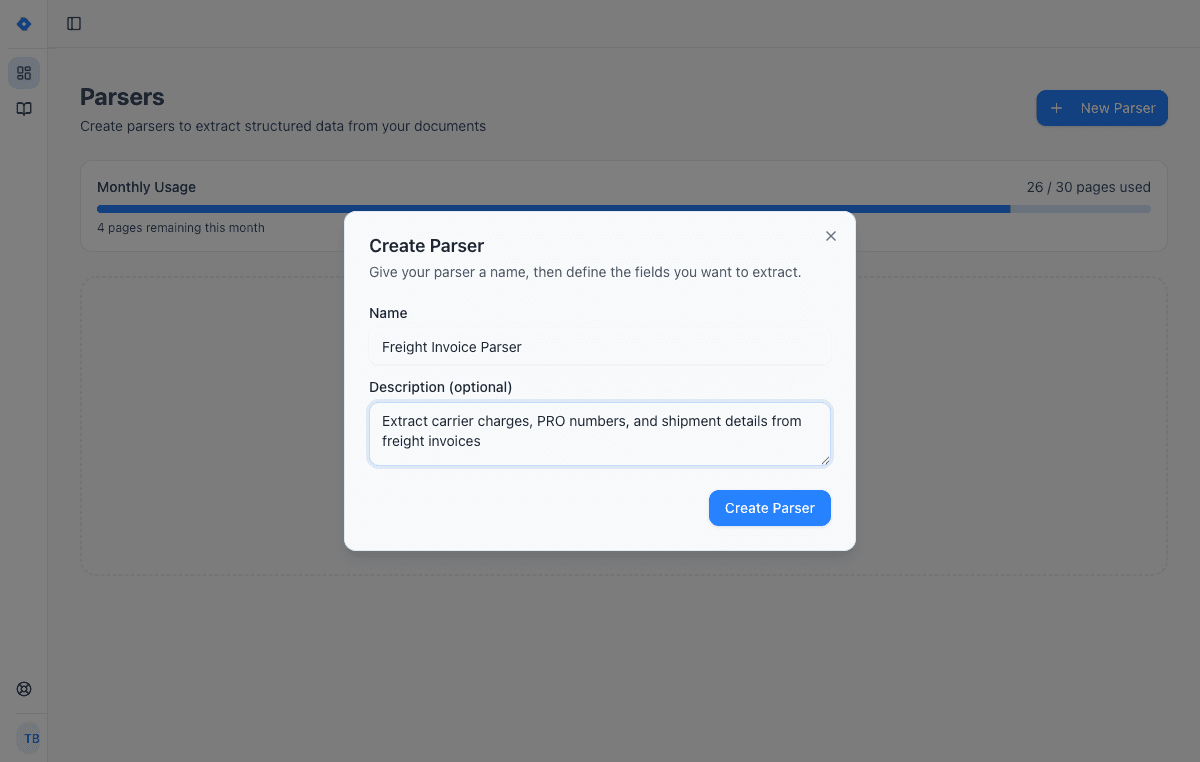
Create a parser
Give your parser a name and description. Each parser is a reusable extraction template — create one for invoices, another for receipts, another for contracts.
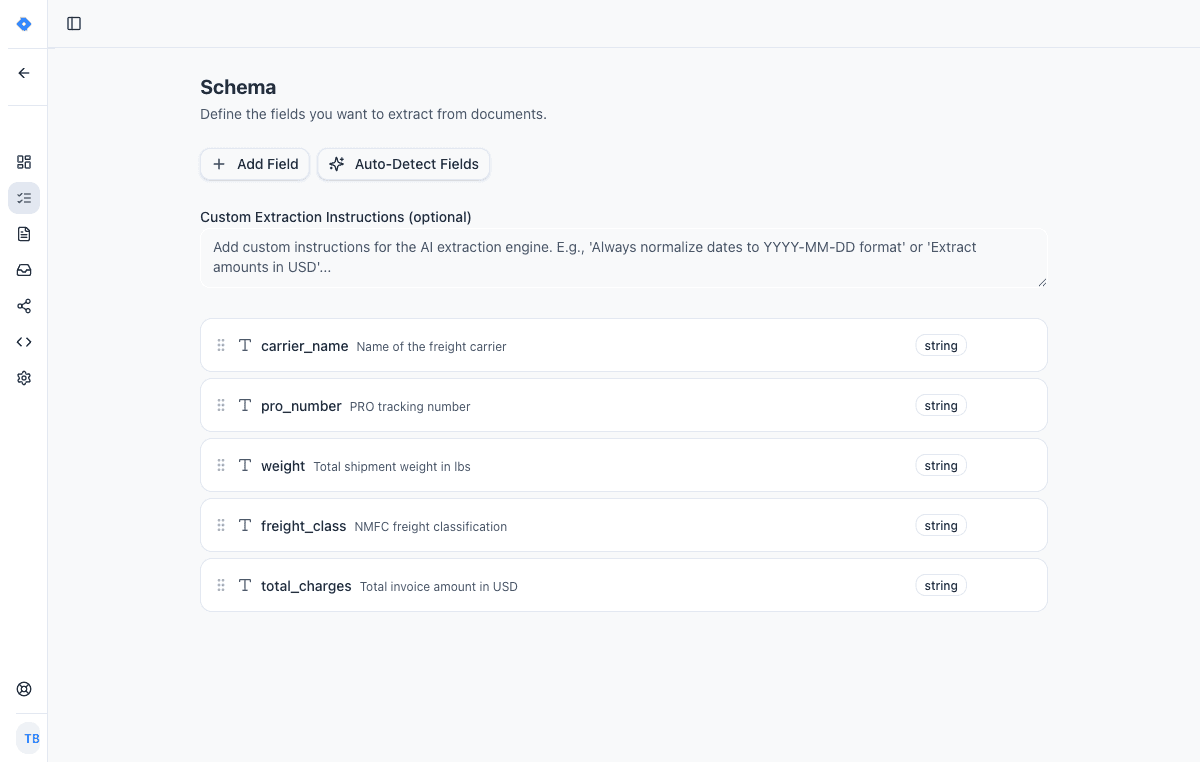
Define your schema
Tell the AI exactly what data to extract. Add fields like “invoice number”, “line items”, or “total amount” — choose from 15 field types including tables, objects, and lists.
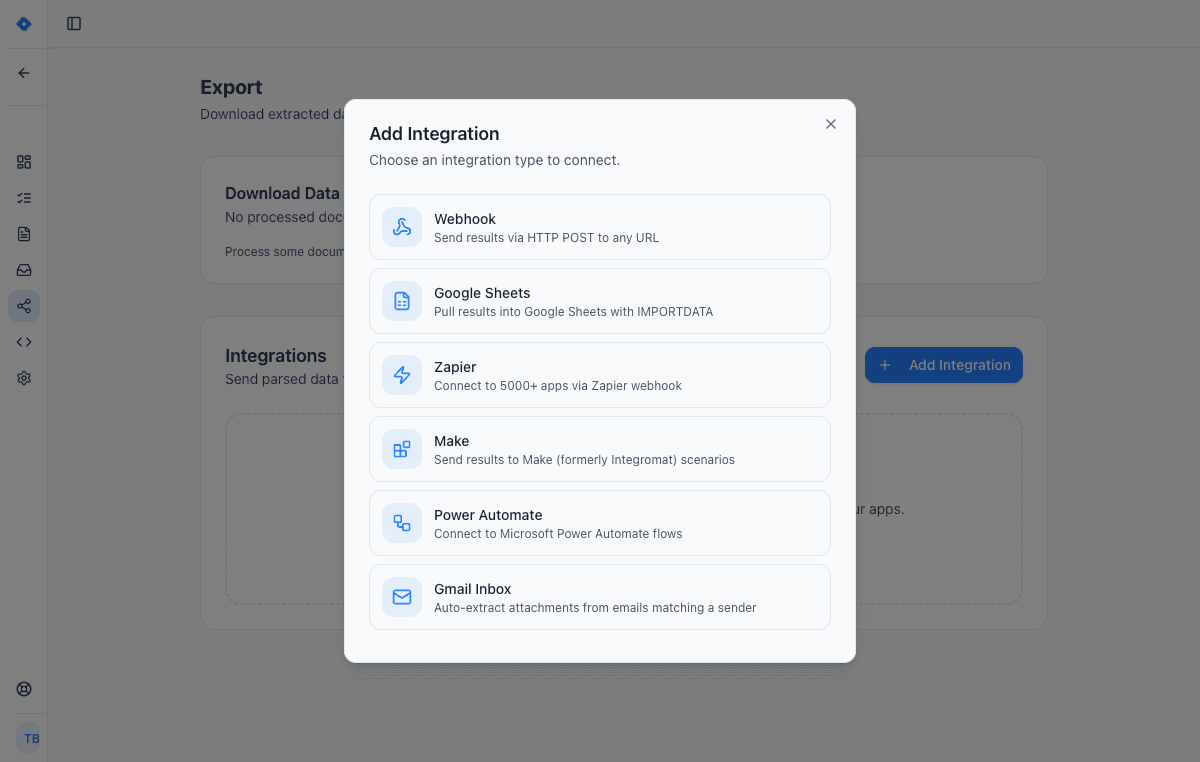
Connect your tools
Send extracted data wherever you need it — Google Sheets, Zapier, Make, Power Automate, webhooks, or Gmail inbox. One-click setup, no code required.
Features
Why teams choose Parsli
Works on Any Vendor Format
No per-vendor templates or training. Parsli's AI reads invoice structure semantically and extracts data from any layout — domestic, international, handwritten, or typed.
Accurate Line Item Extraction
Multi-row tables with descriptions, quantities, unit prices, discounts, and amounts — extracted correctly. Even complex layouts with merged cells and varying column positions.
77% Lower Processing Cost
IOFM benchmarks show manual invoice processing costs $6.30 per invoice. With Parsli, it's approximately $1.45 per invoice — a 77% cost reduction that compounds at scale.
Connects to Your Accounting Stack
Integrate with [QuickBooks](/guides/extract-invoice-data-to-quickbooks), Xero, Google Sheets, or any tool via [Zapier](/guides/parse-email-attachments-with-zapier), [Make](/guides/automate-receipt-processing-with-make), webhooks, or REST API.
No credit card required · 30 free pages/month
Why AI Invoice Processing?
If your AP team processes more than 50 invoices per month, manual data entry is your biggest hidden cost. According to IOFM, manual invoice processing costs approximately $6.30 per invoice — covering labor, error correction, and rework time. At 500 invoices per month, that's $3,150 in pure processing costs before accounting for late payment penalties from backlogs.
AI invoice processing eliminates manual data entry entirely. The AI reads each invoice, identifies every field — vendor, amount, line items, dates, PO numbers — and delivers structured data to your accounting system in seconds. Your AP team reviews and approves instead of typing. The result: faster processing, fewer errors, and no more late payments from data entry backlogs.
What Data Can AI Extract from Invoices?
Parsli extracts every standard invoice field: invoice number, invoice date, due date, vendor name and address, billing address, PO number, payment terms, line items (description, quantity, unit price, discount, tax, and total per line), subtotal, tax amount, discount amount, total amount, and bank/payment details. You can also define custom fields — GL codes, project numbers, department names, cost centers — using plain English instructions.
For line item tables, the AI handles multi-row descriptions, merged cells, varying column layouts, and tables that span multiple pages. It reads the table structure the way you would — identifying headers, row boundaries, and totals — regardless of how the vendor formats their invoice. Learn how to [automate invoice processing for your small business](/guides/automate-invoice-processing-for-small-business).
AI vs Template-Based Invoice Parsing
Traditional invoice parsers require you to create a template for each vendor's invoice layout. You draw zones around fields, set extraction rules, and test. When a vendor changes their invoice design — or you onboard a new vendor — you create a new template. For AP teams working with 50+ vendors, template maintenance becomes a full-time job.
AI-powered invoice processing requires zero per-vendor setup. Parsli's AI understands invoice structure semantically — reading context to identify fields rather than looking at fixed positions. New vendor? Just send the invoice. Format change? The AI adapts automatically. The result: no template backlog, no maintenance overhead, and no delays when onboarding new vendors. See the detailed comparison in our guide to [the best invoice OCR software](/blog/best-invoice-ocr-software).
FAQ
Frequently asked questions
How much does AI invoice processing cost?
Parsli starts at $20/month for 250 pages. The free tier includes 30 pages/month. At scale, invoice processing costs as low as 1¢ per page — compared to $6.30 per invoice for manual processing (IOFM).
Can AI handle invoices from any vendor?
Yes. Parsli's AI adapts to any vendor's invoice format without templates or per-vendor configuration. New vendor? Just send the invoice and Parsli extracts the data.
Does it extract line item tables?
Yes. Multi-row tables with descriptions, quantities, unit prices, discounts, and amounts are extracted accurately — even across multiple pages or with complex layouts.
Can I send invoices from email?
Yes. Forward invoice emails to your Parsli inbox or connect Gmail directly. Both the email body and PDF/image attachments are processed. See our guide to [parse email attachments automatically](/guides/parse-email-attachments-automatically).
Does Parsli integrate with QuickBooks?
Yes. Extracted invoice data can be sent to QuickBooks via Zapier or webhooks. See our [QuickBooks invoice import guide](/guides/extract-invoice-data-to-quickbooks) for step-by-step setup.
How does this compare to the existing Invoice Parsing solution?
Both use the same AI engine. The [Invoice Parsing solution](/solutions/invoice-parsing) focuses on the technical parsing workflow. This page focuses on the AI-powered processing benefits for AP teams and business buyers.
Explore
One platform, every document type
Same AI extraction engine for all your document processing needs
Convert Any PDF to Excel
In Seconds, Not Hours
Learn moreAutomate Invoice Parsing
With AI, Not Templates
Learn moreConvert Bank Statements to Excel
Instantly, From Any Bank
Learn moreParse Any Document
Without Writing Code
Learn moreDocument Parsing API
One Call, Structured Data
Learn moreAutomate Logistics Document Processing
From Loading Dock to Database
Learn moreAI Document Parser
That Actually Works
Learn moreIntelligent Document Processing
Without the Enterprise Price Tag
Learn moreDocument Processing Software
Powered by AI, Not Templates
Learn moreRelated workflows
Specific workflows this solution powers end-to-end.
Works with your stack
Route extracted data straight into the tools your team already uses.
QuickBooks Online
The native QuickBooks Online integration AP teams use as a QuickBooks receipt scanner and bill-posting engine. AI reads invoices, vendor bills, and card receipts, then creates QuickBooks Bills, Expenses, or Invoices with the source PDF attached. No Zapier middleware, no per-vendor templates. Connect over Intuit's official OAuth in under 60 seconds.
Xero
Stop manually entering invoices into Xero. Parsli extracts vendor, amount, date, and line items from any invoice format and pushes the data to Xero via Zapier or Make — automatically.
Google Sheets
Paste one IMPORTDATA formula into a Google Sheet and every document Parsli parses — PDFs, invoices, bank statements, emails — appears as a new row. No Zapier, no middleware, no manual export.
Gmail
Set up a Gmail filter, forward matching emails to Parsli, and every invoice, receipt, order, or confirmation becomes structured data in your Sheet, QuickBooks, CRM, or API. Read-only access, no rules to maintain, no Zapier middleware.
Documents we parse
Specific document formats this solution handles out of the box.
Industries using this
Teams in these verticals commonly deploy this solution.
Ready to stop entering invoice data manually?
Start extracting structured data in minutes. No credit card required.
No credit card required · 30 free pages/month · Cancel anytime