Document Processing Software
Powered by AI, Not Templates
Automate document processing with AI that reads any format, extracts the data you need, and delivers it to your systems — no templates, no rules, no code.
No credit card required · 30 free pages/month
Why Parsli?
Stop processing documents manually
Without Parsli
- Manual data entry from documents takes hours per day
- Different formats require different processing approaches
- Scanned and image documents can't be processed digitally
- Template-based tools break on layout changes
- No visibility into processing status or accuracy
With Parsli
- AI extracts data from any document in seconds
- One platform handles all document formats
- Built-in OCR processes scans and images
- AI adapts to layout changes automatically
- Per-field confidence scores for quality control
Reduce document processing costs by 77%.
One Platform for All Document Types
Invoices, contracts, bank statements, receipts, shipping documents, medical records — Parsli processes them all with a single AI engine. No per-document-type licensing or configuration.
Compatibility
Every document format supported
How It Works
Three steps to structured data
Upload or Send Documents
Upload files directly, forward emails, connect via API, or set up automatic ingestion from email, webhooks, or cloud storage.
AI Processes and Extracts
Parsli's AI reads each document, identifies the fields you defined, and extracts structured data with 95%+ accuracy.
Data Delivered to Your Systems
Extracted data flows to Google Sheets, your ERP, CRM, or any system via Zapier, Make, webhooks, or REST API.
See It In Action
From document to structured data in minutes
No complex setup. No code required. Just define what you need and let AI do the rest.
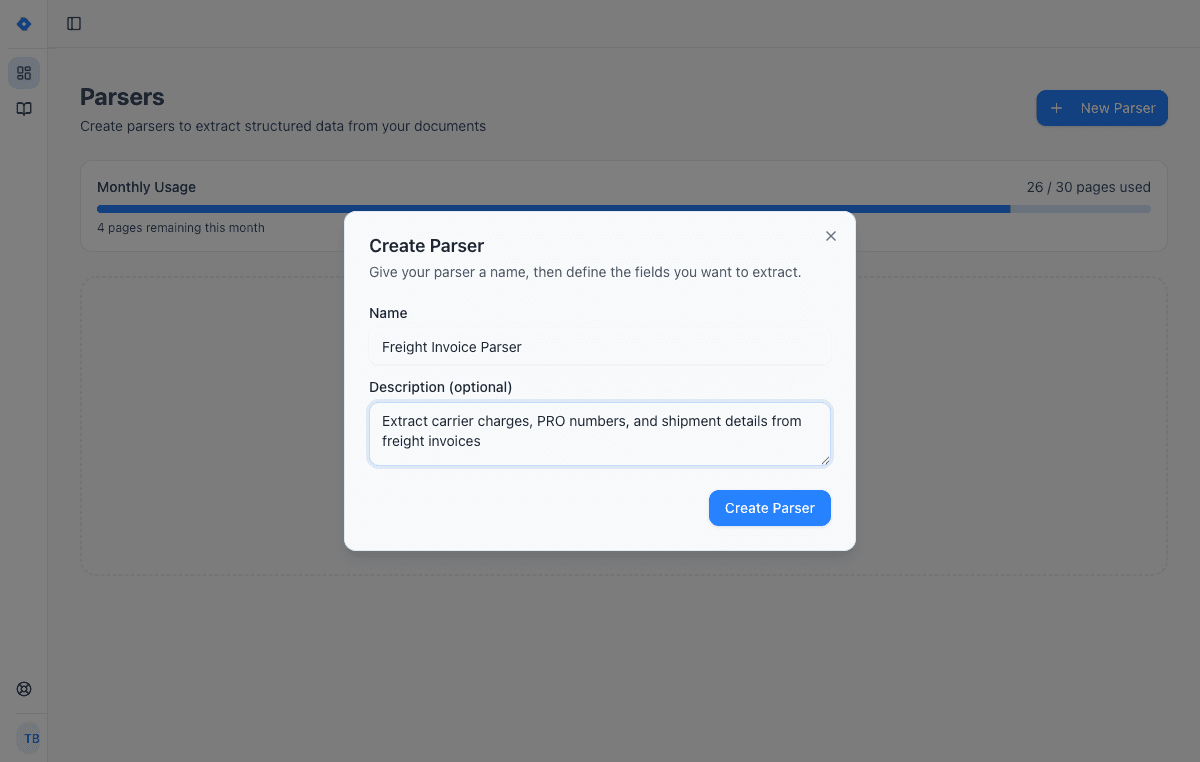
Create a parser
Give your parser a name and description. Each parser is a reusable extraction template — create one for invoices, another for receipts, another for contracts.
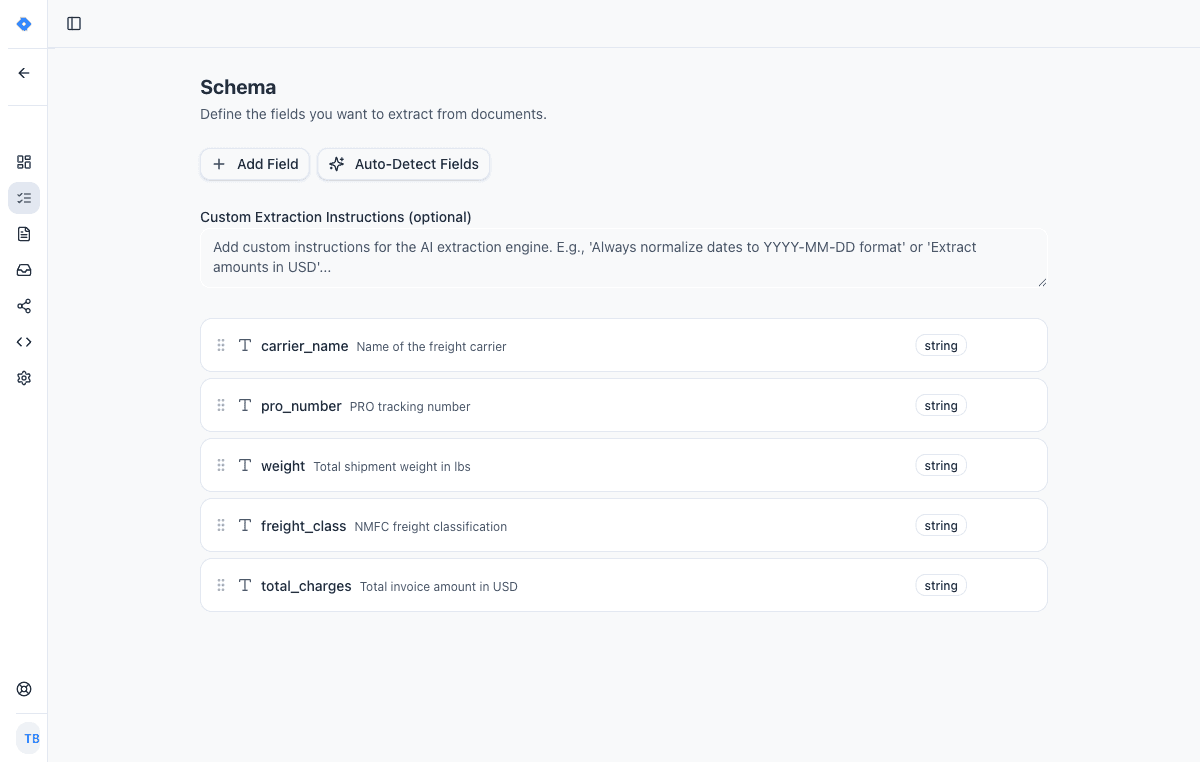
Define your schema
Tell the AI exactly what data to extract. Add fields like “invoice number”, “line items”, or “total amount” — choose from 15 field types including tables, objects, and lists.
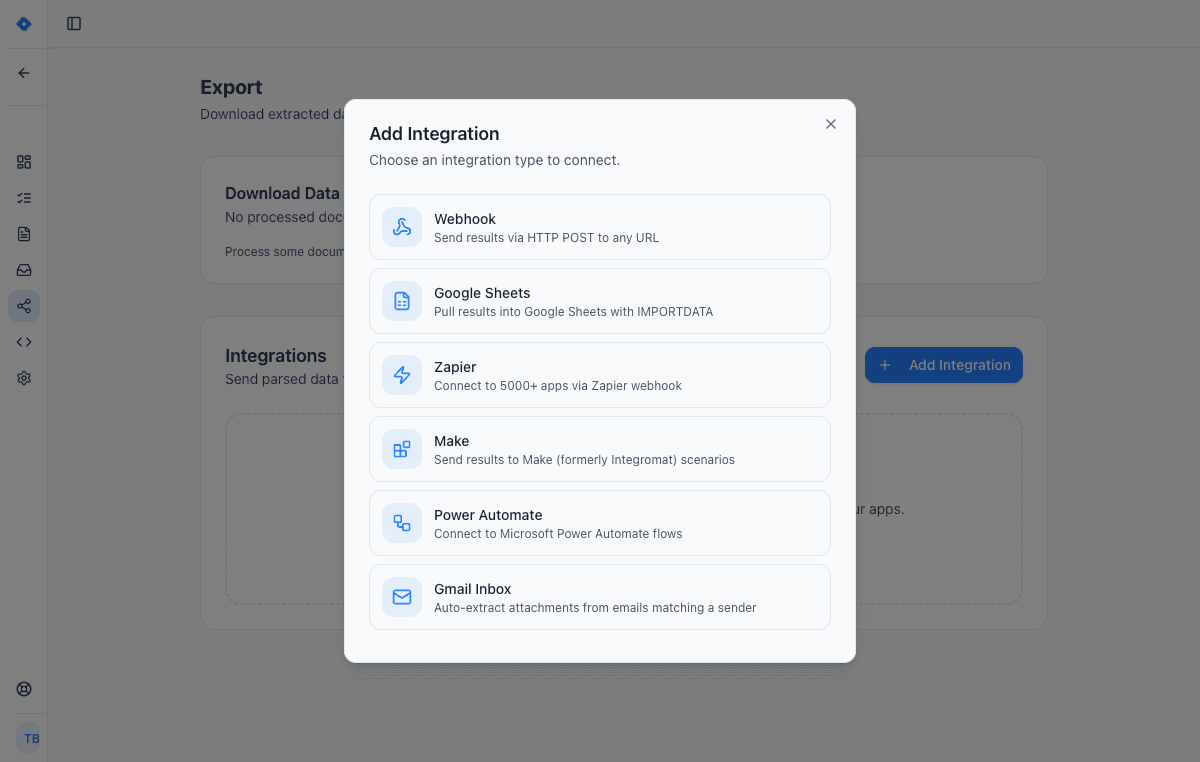
Connect your tools
Send extracted data wherever you need it — Google Sheets, Zapier, Make, Power Automate, webhooks, or Gmail inbox. One-click setup, no code required.
Features
Why teams choose Parsli
Any Document, Any Format
PDFs, scans, images, emails, Word, Excel — Parsli's AI handles every format. According to Deloitte, 80–90% of enterprise data is trapped in unstructured documents. Parsli unlocks it.
AI-Powered Accuracy
95%+ extraction accuracy with per-field confidence scores. Flag low-confidence results for human review and auto-approve the rest.
Reduces Processing Costs by 77%
IOFM benchmarks show manual document processing costs $6.30 per document vs $1.45 for automated processing — a 77% cost reduction that scales with volume.
No-Code + API Flexibility
Operations teams use the visual schema builder. Developers use the [REST API](/solutions/document-parsing-api). Both produce the same high-quality extraction results.
No credit card required · 30 free pages/month
What Is Document Processing Software?
Document processing software automates the extraction of data from business documents — invoices, contracts, bank statements, receipts, forms, and more. Instead of humans manually reading documents and typing data into systems, the software reads the documents, identifies relevant fields, and delivers structured data.
Modern document processing software uses AI (artificial intelligence) to understand document layouts without templates or rules. This is a significant evolution from earlier OCR-based tools that could only recognize characters. AI-powered document processing understands context, identifies fields semantically, and handles any format — including scanned and image-based documents. Learn more about the technology behind it in our guide to [what document parsing is](/blog/what-is-document-parsing).
Manual vs Automated Document Processing
Manual document processing is the default at most organizations: someone reads a document, finds the relevant data, and types it into a spreadsheet or system. This approach is slow (3–10 minutes per document), error-prone (1–4% error rate according to IOFM), and doesn't scale. A team processing 200 documents per day spends 10–33 hours on data entry alone.
Automated document processing with AI reduces per-document processing time from minutes to seconds, cuts error rates to below 1%, and frees staff to focus on review and decision-making instead of data entry. Forrester estimates that AI-powered document processing reduces overall processing costs by 30–40% compared to semi-automated approaches.
Key Features of AI Document Processing
When evaluating document processing software, look for these capabilities: multi-format support (PDFs, scans, images, emails), built-in OCR for scanned documents, template-free extraction that works on any layout, a visual schema builder for non-technical users, an API for developer integration, per-field confidence scores for quality control, and integrations with your downstream systems.
The most important differentiator is whether the software requires templates. Template-based tools need per-format configuration and break when layouts change. AI-powered tools like Parsli read documents the way a human would — understanding context and extracting data regardless of layout. This eliminates the largest ongoing cost: template maintenance across hundreds of document variations.
FAQ
Frequently asked questions
What types of documents can be processed?
Any document containing extractable data: invoices, contracts, bank statements, receipts, purchase orders, shipping documents, insurance claims, medical records, tax forms, and more. Parsli supports PDFs, scans, images, emails, Word, and Excel files.
How much does document processing cost?
Parsli plans start at $20/month for 250 pages. The free tier includes 30 pages/month. At scale, costs go as low as 1¢ per page — versus $6.30 per document for manual processing (IOFM benchmark).
Does it work with scanned documents?
Yes. Built-in OCR powered by Google Gemini 2.5 Pro handles scanned, photographed, and image-based documents. No separate OCR tool needed.
Can I process documents without code?
Yes. The [no-code document parser](/solutions/no-code-document-parser) includes a visual schema builder that lets anyone define extraction fields in plain English. Developers can also use the REST API.
How fast is automated document processing?
Most documents are processed in under 3 seconds. A batch of 100 invoices processes in minutes, not hours. There's no daily processing limit beyond your plan's monthly page quota.
Explore
One platform, every document type
Same AI extraction engine for all your document processing needs
Convert Any PDF to Excel
In Seconds, Not Hours
Learn moreAutomate Invoice Parsing
With AI, Not Templates
Learn moreConvert Bank Statements to Excel
Instantly, From Any Bank
Learn moreParse Any Document
Without Writing Code
Learn moreDocument Parsing API
One Call, Structured Data
Learn moreAutomate Logistics Document Processing
From Loading Dock to Database
Learn moreAI Document Parser
That Actually Works
Learn moreIntelligent Document Processing
Without the Enterprise Price Tag
Learn moreAI Invoice Processing
Zero Templates, Any Vendor
Learn moreRelated workflows
Specific workflows this solution powers end-to-end.
Document Automation
Build end-to-end document processing workflows without writing code. From document ingestion to data extraction to delivery — fully automated.
PDF Data Extraction
Turn any PDF into structured, usable data. Parsli's AI reads text, tables, forms, and even [handwritten content](/guides/extract-data-from-handwritten-documents) from both digital and scanned PDFs.
Works with your stack
Route extracted data straight into the tools your team already uses.
Google Sheets
Paste one IMPORTDATA formula into a Google Sheet and every document Parsli parses — PDFs, invoices, bank statements, emails — appears as a new row. No Zapier, no middleware, no manual export.
QuickBooks Online
The native QuickBooks Online integration AP teams use as a QuickBooks receipt scanner and bill-posting engine. AI reads invoices, vendor bills, and card receipts, then creates QuickBooks Bills, Expenses, or Invoices with the source PDF attached. No Zapier middleware, no per-vendor templates. Connect over Intuit's official OAuth in under 60 seconds.
REST API
A developer-friendly REST API for extracting structured data from documents. Send files, receive typed JSON. Standard HTTP conventions with Bearer token authentication.
Zapier
Use Parsli to extract structured data from any email or document, then use Zapier to route the data to any of 5,000+ apps — CRMs, databases, project tools. Parsli replaces Zapier's built-in Email Parser with real AI; Zapier handles the routing.
Documents we parse
Specific document formats this solution handles out of the box.
Industries using this
Teams in these verticals commonly deploy this solution.
Ready to stop processing documents manually?
Start extracting structured data in minutes. No credit card required.
No credit card required · 30 free pages/month · Cancel anytime