AI-Powered Email Management
Extract Data, Not Just Read
Stop manually reading emails to extract data. Parsli's AI parses email bodies and attachments — invoices, order confirmations, shipping notices — and delivers structured data to your tools.
No credit card required · 30 free pages/month
Why Parsli?
Stop copy-pasting data from emails
Without Parsli
- Manually reading emails to find and copy data
- Attachments pile up with no way to extract data at scale
- Email rules and filters don't understand content
- Important data buried in email threads
- Hours spent forwarding, downloading, and re-typing
With Parsli
- AI reads email bodies and extracts specific fields
- Attachments parsed automatically — PDFs, images, docs
- Content-aware parsing, not just keyword filtering
- Data extracted and delivered in real time
- Set up once — emails processed automatically
Reclaim the 13 hours per week spent managing email.
Emails + Attachments, Parsed Together
Parsli processes both the email body and any attached documents in a single extraction. Forward an invoice email and get vendor name, amount, line items, and due date — all from one forwarded message.
Compatibility
Every document format supported
How It Works
Three steps to structured data
Forward or Connect Your Inbox
Forward emails to your Parsli inbox, or connect Gmail for automatic processing. No email migration required.
AI Extracts Data from Content
Parsli reads the email body and all attachments, extracting the specific fields you defined — dates, amounts, names, line items, and more.
Data Flows to Your Systems
Extracted data is sent to Google Sheets, your CRM, accounting software, or any tool via Zapier, Make, webhooks, or API.
See It In Action
From document to structured data in minutes
No complex setup. No code required. Just define what you need and let AI do the rest.
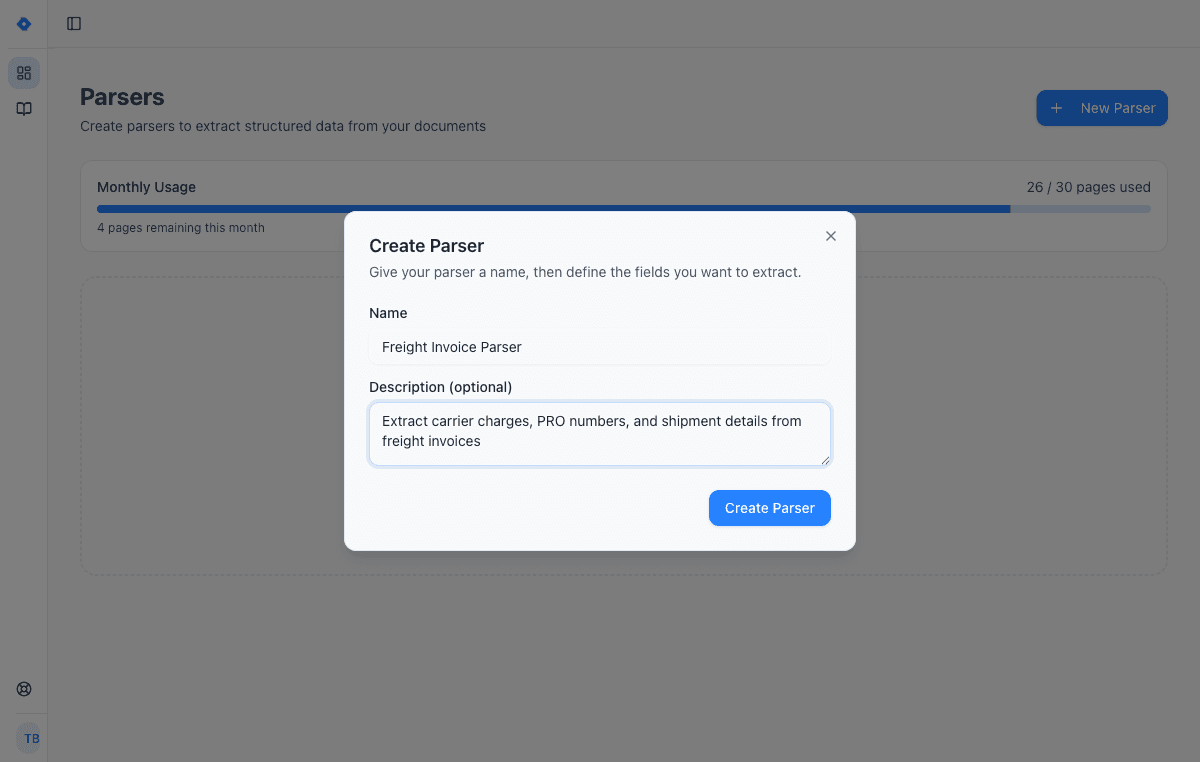
Create a parser
Give your parser a name and description. Each parser is a reusable extraction template — create one for invoices, another for receipts, another for contracts.
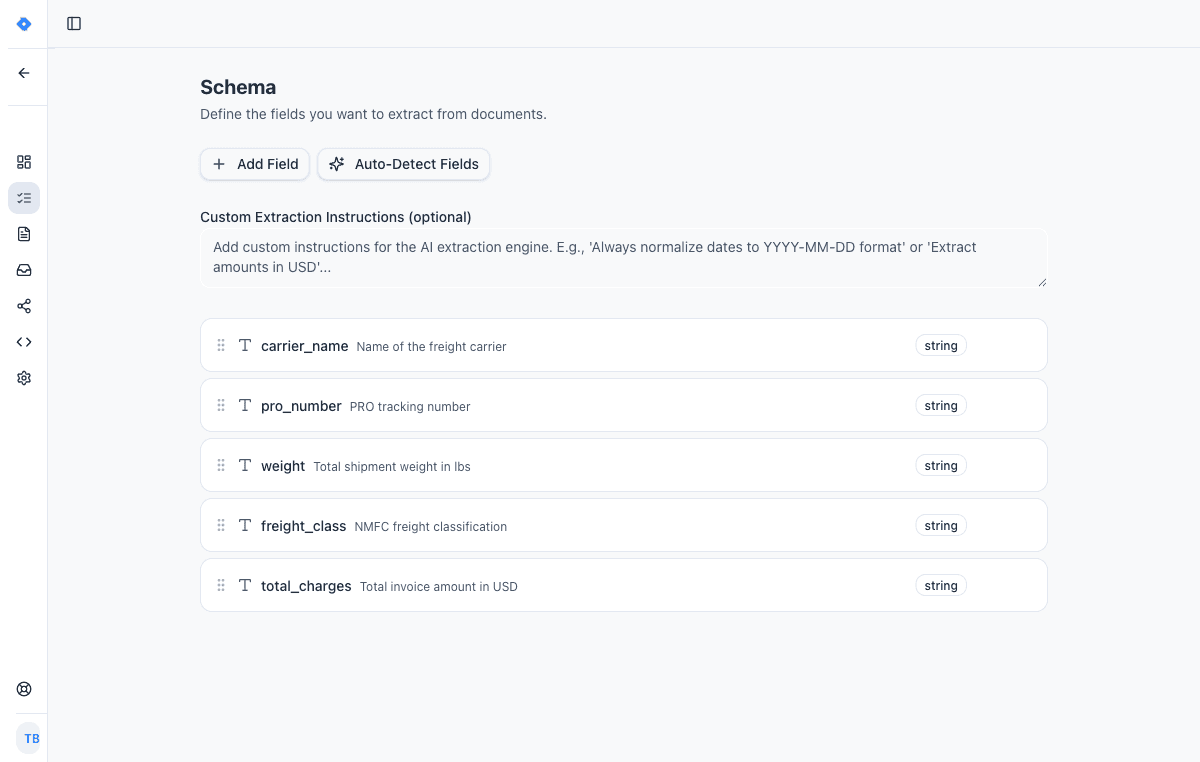
Define your schema
Tell the AI exactly what data to extract. Add fields like “invoice number”, “line items”, or “total amount” — choose from 15 field types including tables, objects, and lists.
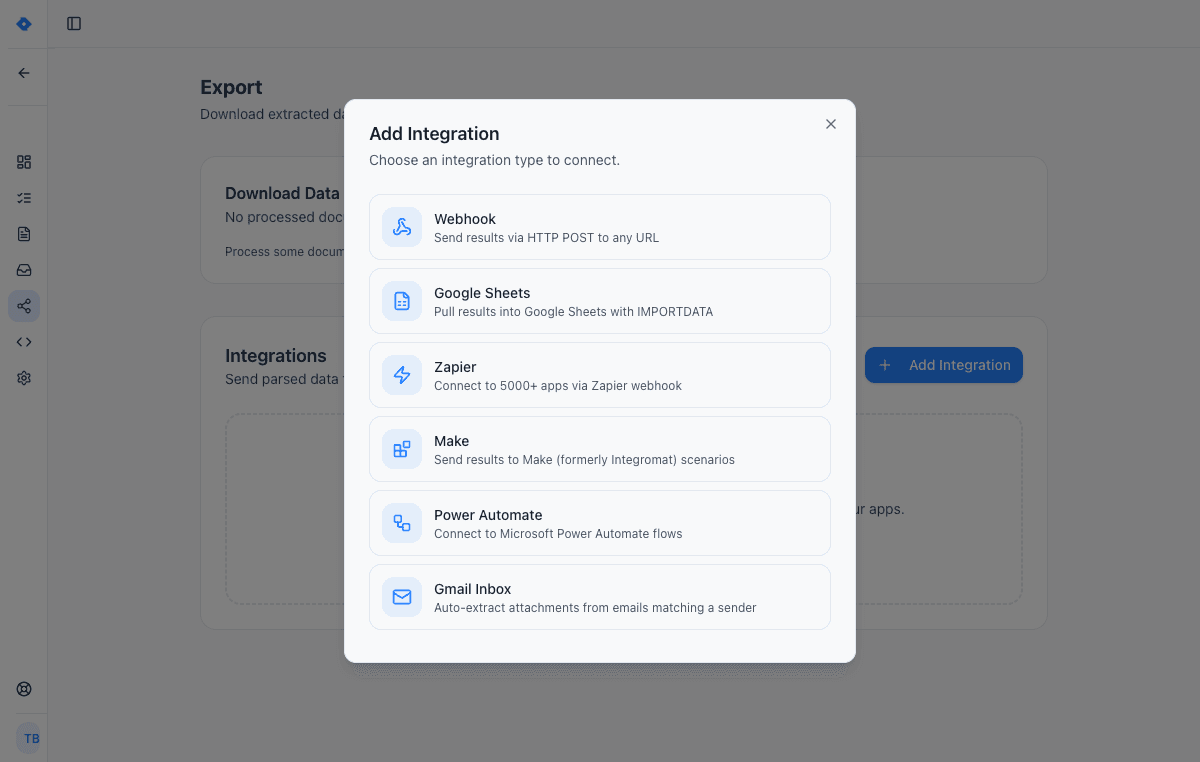
Connect your tools
Send extracted data wherever you need it — Google Sheets, Zapier, Make, Power Automate, webhooks, or Gmail inbox. One-click setup, no code required.
Features
Why teams choose Parsli
Parse Email Bodies and Attachments
Most email tools only filter or sort. Parsli reads the actual content — extracting specific data fields from both the email text and any attached documents.
Works with Any Email Format
Order confirmations, shipping notices, invoice emails, lead notifications, booking confirmations — the AI adapts to any email format without templates.
Gmail Integration Built In
Connect your Gmail account for automatic processing, or forward emails manually. [Parse email attachments automatically](/guides/parse-email-attachments-automatically) with zero manual intervention.
Replace Manual Data Entry from Email
According to McKinsey Global Institute, the average knowledge worker spends 28% of their workweek — roughly 13 hours — managing email. Parsli automates the data extraction part of that time.
No credit card required · 30 free pages/month
Why Email Management Needs AI
Traditional email management tools — filters, labels, folders — organize messages but don't understand their content. When you receive 50 invoices, 30 order confirmations, or 20 shipping notifications per day, the bottleneck isn't sorting emails. It's extracting the data locked inside them.
According to McKinsey Global Institute, the average knowledge worker spends 28% of their workweek — roughly 13 hours — managing email. A significant portion of that time goes to reading messages, finding relevant data, and manually entering it into spreadsheets or systems. AI-powered email management eliminates that manual extraction step entirely: emails arrive, data is extracted, and structured results flow to your tools automatically.
Email Parser vs Email Client: Different Problems, Different Tools
An email client (Gmail, Outlook) helps you read, organize, and respond to emails. An email parser extracts structured data from emails so you don't have to read them at all — at least not for data entry purposes. These are complementary tools, not replacements.
Parsli works alongside your existing email setup. Forward emails to your Parsli inbox, or [connect Gmail directly](/integrations/gmail). The AI reads the email body and all attachments, extracts the fields you defined, and sends structured data to your downstream systems. Your inbox stays the same — but the manual data entry disappears. For detailed setup, see our guide to [parse email attachments with Zapier](/guides/parse-email-attachments-with-zapier).
Automate Email Data Extraction at Scale
For businesses processing dozens or hundreds of emails daily — accounts payable teams, operations departments, customer service teams — manual email data extraction doesn't scale. Each email takes 2–5 minutes to read, extract data from, and enter into a system. At 100 emails per day, that's 3–8 hours of pure data entry.
With Parsli, each email is processed in seconds. Forward emails automatically using inbox rules, and extracted data appears in Google Sheets or your system of choice within moments. The result: your team reviews and acts on data instead of typing it. Whether you're processing [invoices from email](/guides/automate-invoice-processing-for-small-business), capturing lead data from form submissions, or extracting shipping details from carrier notifications, the workflow is the same — forward the email, get the data.
FAQ
Frequently asked questions
How does Parsli extract data from emails?
Forward emails to your Parsli inbox or connect Gmail. The AI reads the email body and all attachments, extracting the specific fields you defined in your schema — dates, amounts, vendor names, line items, and more.
Can Parsli parse email attachments?
Yes. PDF, image, Word, and Excel attachments are all processed alongside the email body. Parsli extracts data from both in a single pass.
Does it work with Gmail and Outlook?
Gmail integration is built in. For Outlook and other providers, forward emails to your Parsli inbox using email rules for automatic processing. See our [Gmail integration](/integrations/gmail) and [Outlook integration](/integrations/outlook) guides.
What types of emails can be parsed?
Any email with extractable data: invoices, order confirmations, shipping notifications, booking confirmations, lead form submissions, receipts, and more. The AI adapts to any email format without templates.
How is this different from Zapier Email Parser?
Zapier's email parser uses basic template matching — you highlight fields manually. Parsli uses AI to understand email content semantically, handles attachments, and works on any format without per-email templates. See the [full comparison](/compare/zapier-email-parser).
Can I process emails automatically without forwarding?
Yes. Connect your Gmail account directly and Parsli monitors your inbox for matching emails. No manual forwarding required.
Explore
One platform, every document type
Same AI extraction engine for all your document processing needs
Convert Any PDF to Excel
In Seconds, Not Hours
Learn moreAutomate Invoice Parsing
With AI, Not Templates
Learn moreConvert Bank Statements to Excel
Instantly, From Any Bank
Learn moreParse Any Document
Without Writing Code
Learn moreDocument Parsing API
One Call, Structured Data
Learn moreAutomate Logistics Document Processing
From Loading Dock to Database
Learn moreAI Document Parser
That Actually Works
Learn moreIntelligent Document Processing
Without the Enterprise Price Tag
Learn moreDocument Processing Software
Powered by AI, Not Templates
Learn moreAI Invoice Processing
Zero Templates, Any Vendor
Learn moreReady to stop manually extracting data from emails?
Start extracting structured data in minutes. No credit card required.
No credit card required · 30 free pages/month · Cancel anytime