Define what to extract
Define what to extract
Fields are how you describe the data you want. Naming them well is the single biggest driver of accuracy.
A Field definition is the list of things you want pulled out of every document. In the app it is Fields & Tables.
The one thing that matters most
Name fields for what you mean, not for what is printed.
Parsli works from meaning, so the name of a field is not a label — it is an instruction. This is where nearly all accuracy problems begin and end.
| Instead of | Use | Why |
|---|---|---|
amount | total_including_tax | An invoice has a subtotal, a tax line, and a total |
date | due_date | There are usually three dates on an invoice |
number | invoice_number | There is also a PO number and an account number |
name | vendor_name | The customer name is on there too |
If a colleague could misread the field name, so can the engine. Every minute spent here saves ten spent debugging results.
Adding fields
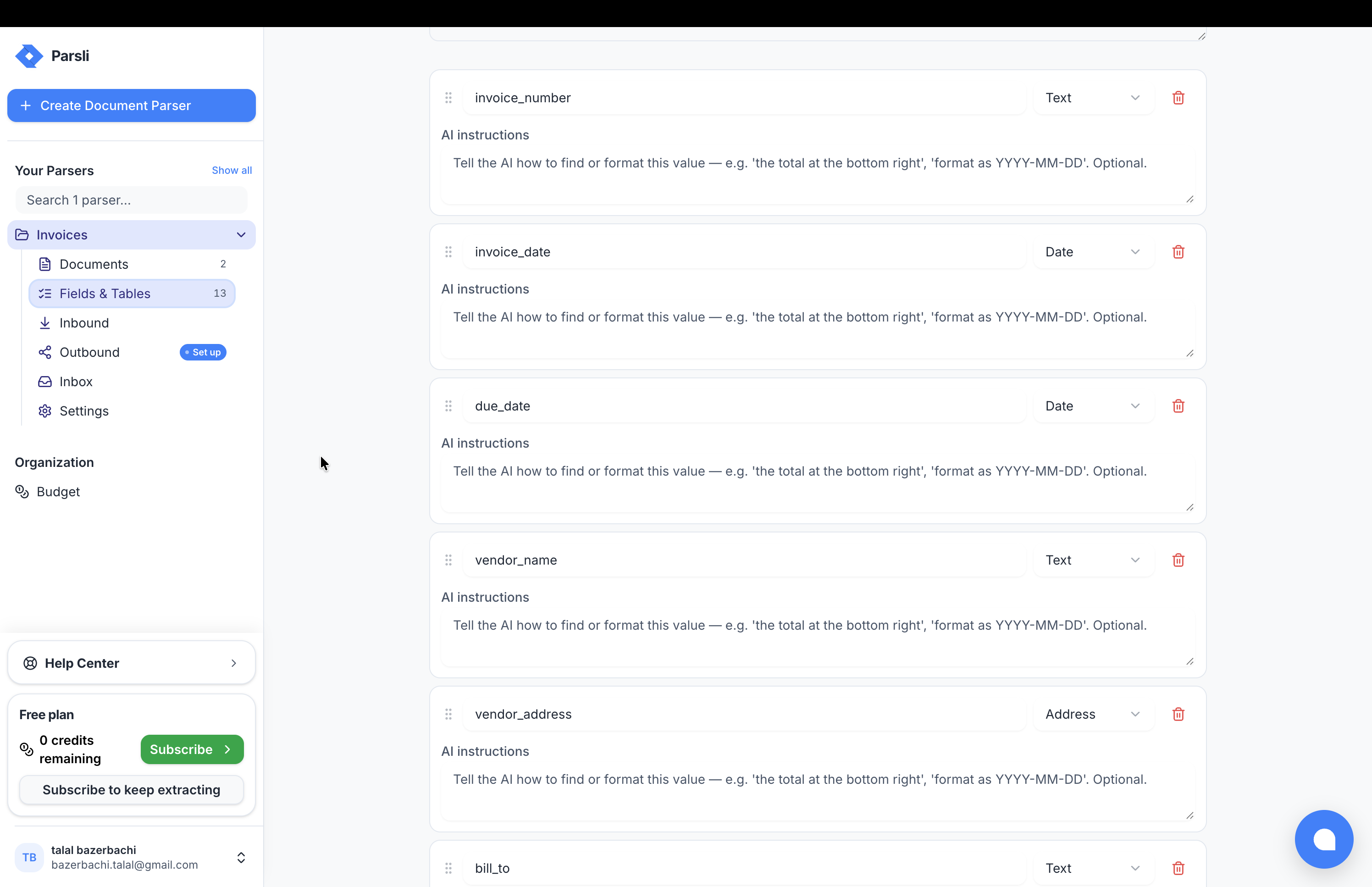
Open Fields & Tables and add a field with:
- A name — precise, as above
- A Field type — picked from the dropdown beside the name
- Extraction instructions (optional) — the box labelled AI instructions beneath each field, for anything the name cannot carry on its own
You can also let Parsli propose a starting set with AI detect fields: upload one sample and edit what it suggests. Faster than starting from an empty list, and it shows you how the engine reads your document.
Field types
Pick the type that matches the data, not the type that always works. A currency amount typed as text comes back as text — currency symbol, thousands separators and all — and you will be parsing strings downstream forever.
The dropdown shows friendly names; the API returns the value in the right-hand column. They are the same thing.
| In the app | In the API | Use for |
|---|---|---|
| Text, Rich text | string, richtext | Names, descriptions, notes |
| Email, URL, Phone, Address | email, url, phone, address | Contact details |
| Number, Decimal | number, decimal | Quantities, amounts, prices |
| Date, Boolean | date, boolean | Dates, yes/no |
| Single select, Multi select | single_select, multi_select | Categories that must be one of a known set |
| Object, List, Table | object, list, table | Grouped, repeating, or nested data |
Two worth knowing about specifically:
decimal for money. number is for counts. Using decimal for amounts gets you a JSON number you can total, not a string you have to clean.
Select fields for categories. If a field should only ever be Hardware, Software, or Services, constrain it. You get consistent values instead of a long tail of near-synonyms that break every grouping downstream.
Repeating and nested data
Line items, transactions, anything that appears more than once per document — that is a Table field, not five numbered fields.
Grouped data — a vendor with a name, an address, and a tax number — is an Object field.
This is the most common structural mistake. Full detail: tables and nested data.
When the name is not enough
Some things cannot be expressed in a field name. That is what descriptions and Extraction instructions are for — "use the total after any early-payment discount", "if no PO number is printed, use the invoice number".
Full detail: extraction instructions.
Fields cost nothing
Fields are not metered. A definition with forty fields costs exactly the same as one with four — you are billed by Page, never by field.
So there is no reason to be sparing. If a value might be useful later, extract it now; adding it in six months means reprocessing everything.
Tip: Change one thing at a time and re-run the same document. Changing four things at once tells you nothing about which one worked.
Next
- Tables and nested data
- Extraction instructions
- Check the results — reading output and fixing what is wrong
Something here wrong or missing? Tell us — we treat it as a bug.